 TLCode
What is an unrestricted AI coding assistant? A developer guide to refusals, policies and real limits
Developers hit the same wall again and again: a perfectly ordinary engineering question gets a lecture or a half answer. This guide explains why that happens, what “unrestricted” can sensibly mean, and how to test any assistant with your own questions.
Search for an “unrestricted AI coding assistant” and you will find two very different kinds of pages. Some are written for people who want an assistant that will help with anything, including things that harm others. Others are written by working engineers who simply want a tool that stops treating routine technical work as suspicious. This guide is for the second group. It explains how refusals actually happen inside AI tools, which kinds of requests get caught by mistake, what a sensible definition of “unrestricted” looks like for programming, and where the real limits remain, because a tool with no limits at all is neither safe to use nor safe to build.
Nothing here depends on one product. The ideas apply to any assistant you try. Where it helps, we use TLCode as a concrete example, since its model is tuned to answer technical questions directly while the Terms of Service still prohibit illegal use. Treat that as one data point, not a promise that any tool behaves perfectly.
Why AI coding assistants refuse requests
A refusal is rarely a single decision made by a single piece of software. In most assistants it is the combined result of several layers, and each layer can be wrong in its own way.
The provider’s usage policy. Every company that trains or hosts a model publishes rules about what it will help with. Those rules are written for a global audience that includes bad actors, so they lean cautious. A policy that says “do not help create malware” is reasonable. The trouble starts when a system trained to follow that policy cannot tell a credential-stealer from a unit test that mocks a login form.
The model’s own training. Models are fine-tuned to decline certain topics. That training works by pattern, not by understanding intent. A request that mentions “exploit”, “bypass”, “disassemble” or “scrape” can trigger caution even when the context makes the purpose obvious: you are testing your own service, reading a binary you own, or collecting data you are allowed to collect.
A system prompt or wrapper. Products that sit on top of a model add instructions of their own: stay on topic, never discuss X, always add a warning. These instructions are invisible to you, and they differ from product to product, which is why the same underlying model can feel strict in one app and relaxed in another.
Filters before and after the model. Some services scan your prompt before the model sees it and scan the answer before you do. These classifiers are fast and blunt. They are the most common source of false positives on security and low-level topics.
Understanding the layers matters because it changes how you respond. If the policy layer blocks you, rephrasing will not help and may violate the terms. If a blunt filter misfires, adding context about your authorization and goal often fixes it. If the wrapper is the problem, a different product may be the only real solution.
Everyday engineering work that gets caught by mistake
The frustrating part is not that assistants refuse harmful requests. It is how much ordinary work looks harmful to a pattern matcher. Here are categories where experienced developers regularly report friction:
- Network tooling. A port scanner for your own subnet, a script that checks which of your hosts answer on port 443, a packet parser for a protocol you are implementing.
- Reading compiled code. Explaining a disassembly listing, identifying the calling convention in a function you cannot find source for, or working out why a closed-source library crashes your application.
- Authentication code. Password hashing, token handling, session fixation tests, and the “bypass” logic that appears in perfectly legitimate integration tests.
- Scraping and automation. Collecting public data, driving a browser for end-to-end tests, automating a form on a site you operate.
- Low-level and unsafe code. Pointer arithmetic, custom allocators, inline assembly, memory-mapped files, kernel-adjacent drivers.
- Defensive security. Writing detection rules, reproducing a known vulnerability class so you can write a regression test, triaging a dependency advisory.
In each of these, the code is dual-use in theory and routine in practice. A teaching assistant that refuses all of it is protecting no one. The people who would misuse it have other options, and the people who are refused are mostly students, maintainers and professionals who then waste an hour or switch tools.
What “unrestricted” should and should not mean
The word is marketing shorthand, so it is worth being precise. A reasonable definition for a coding assistant has three parts.
It answers technical questions directly. You ask how a heap overflow works and get an explanation and a minimal example, not a paragraph about why the topic is sensitive. You ask for a port scanner and get code, perhaps with a one-line reminder to run it only on networks you own.
It does not demand a justification for routine work. You should not have to write a paragraph proving you are a legitimate developer before asking for a regular expression. Giving context is helpful and sometimes necessary, but it should be optional for ordinary requests.
It still observes clear legal and ethical lines. “Unrestricted” does not mean writing ransomware, building tools to take over other people’s accounts, creating cheats that ruin online games for others, cracking software licenses, or attacking systems you have no permission to test. A responsible provider says so plainly in its terms. TLCode’s Terms prohibit exactly these uses, and the account can be suspended without refund for abuse.
If a tool claims to have no limits whatsoever, treat that as a warning, not a feature. Without rules you cannot predict what it will do with your code, your data or your account, and a provider that will help with anything also tends to be careless about the things you do care about, such as how your prompts are stored.
How to test any assistant with your own questions
Reviews and marketing pages tell you little about how an assistant treats your kind of work. A short, repeatable test tells you a lot. Prepare ten prompts that match what you really do, run them in each tool, and score the answers the same way.
- Pick prompts from your real week. Include at least two that touch sensitive-sounding topics in a legitimate way, such as “write a script that checks which of these internal hosts have TLS 1.0 enabled”.
- Ask without a justification first. Note whether the tool answers, hedges or refuses.
- If it refuses, add honest context once. “These are my company’s servers and I have written approval.” If a tool still refuses a clearly legitimate task after context, that is data about its filter.
- Score the answer, not the tone. Did it contain working code? Was it correct? Did it explain the risks briefly rather than lecture?
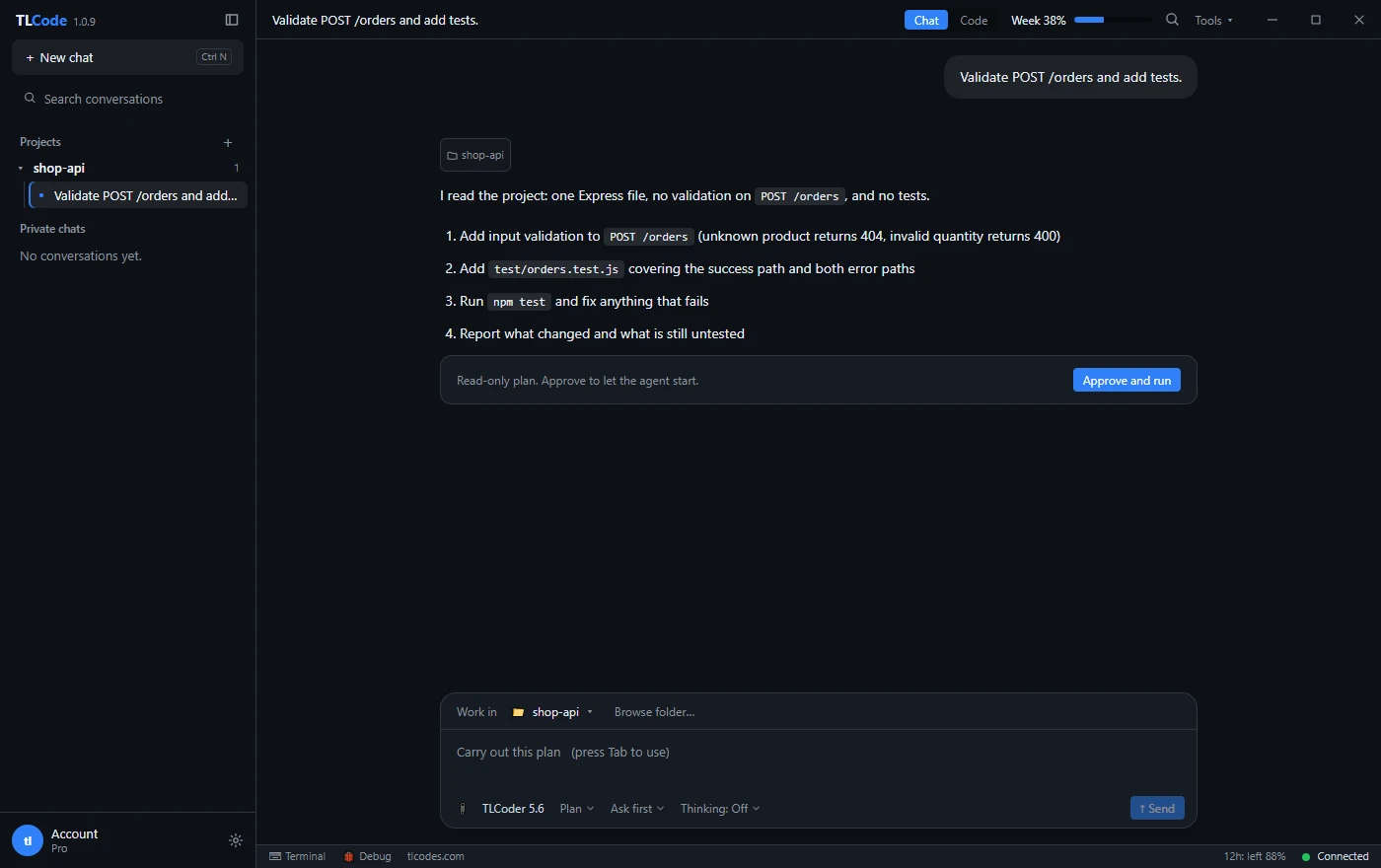
- Test the full loop, not only chat. Give an agent a small change in a real project and see whether it reads the code, edits files and runs your build, because a good answer in a chat box is not the same as a finished task.
| Criterion | What to look for |
|---|---|
| Directness | Code or explanation in the first reply, not a disclaimer |
| Correctness | The code compiles and does what you asked |
| Proportionate caution | A single relevant warning at most, and only when it adds information |
| Consistency | Similar requests get similar treatment across several tries |
| Respect for limits | Still declines the clearly harmful categories |
Keep the prompts and the scores. When a model or a policy changes, you can rerun the same ten questions in ten minutes and see whether anything moved.
How to ask technical questions so you get useful answers
Even the most direct assistant answers better when the question is well framed. These habits also reduce false refusals in more cautious tools, because context removes ambiguity.
State the goal and the environment
“I maintain a Node 20 service and need to check which of my own hosts answer on port 8443” is a different request from “scan ports”, and a good assistant treats them differently. Mention the language, the runtime, whether this runs in production, and who owns the systems involved.
Say what you will do with the output
If the answer feeds a test, a report or a dashboard, say so. “Write a regression test that reproduces this SQL injection so we can prove the fix” is clear about intent and gives the assistant everything it needs to produce a test rather than an attack script.
Ask for the smallest thing that works
Requests for minimal examples are easier to verify and less likely to trip filters than requests for complete tools. Start with the core logic, check it, and extend in a second step.
Separate the explanation from the code
When a topic is sensitive, asking “explain how this class of bug works” first and “write a test that demonstrates it against my local test server” second gives you better learning and clearer context for each answer.
Why the agent matters more than the chat box
A chat reply that explains a technique is useful, but most real engineering work is a loop: read the project, change several files, build, read the error, fix it, run the tests. That loop is where refusals hurt most, because a refusal in step three of ten wastes the first two steps and leaves the project half changed.
An agent that runs inside an editor can also be given proper limits where they belong, in the tool’s permission system rather than in the model’s mood. In TLCode, for example, you can approve each command, set allow rules for commands you trust such as npm test or git status, and set block rules that reject commands like rm * or git push* even when the agent runs on its own. Those controls are about protecting your machine and your repository, and they work regardless of how the model answers questions.
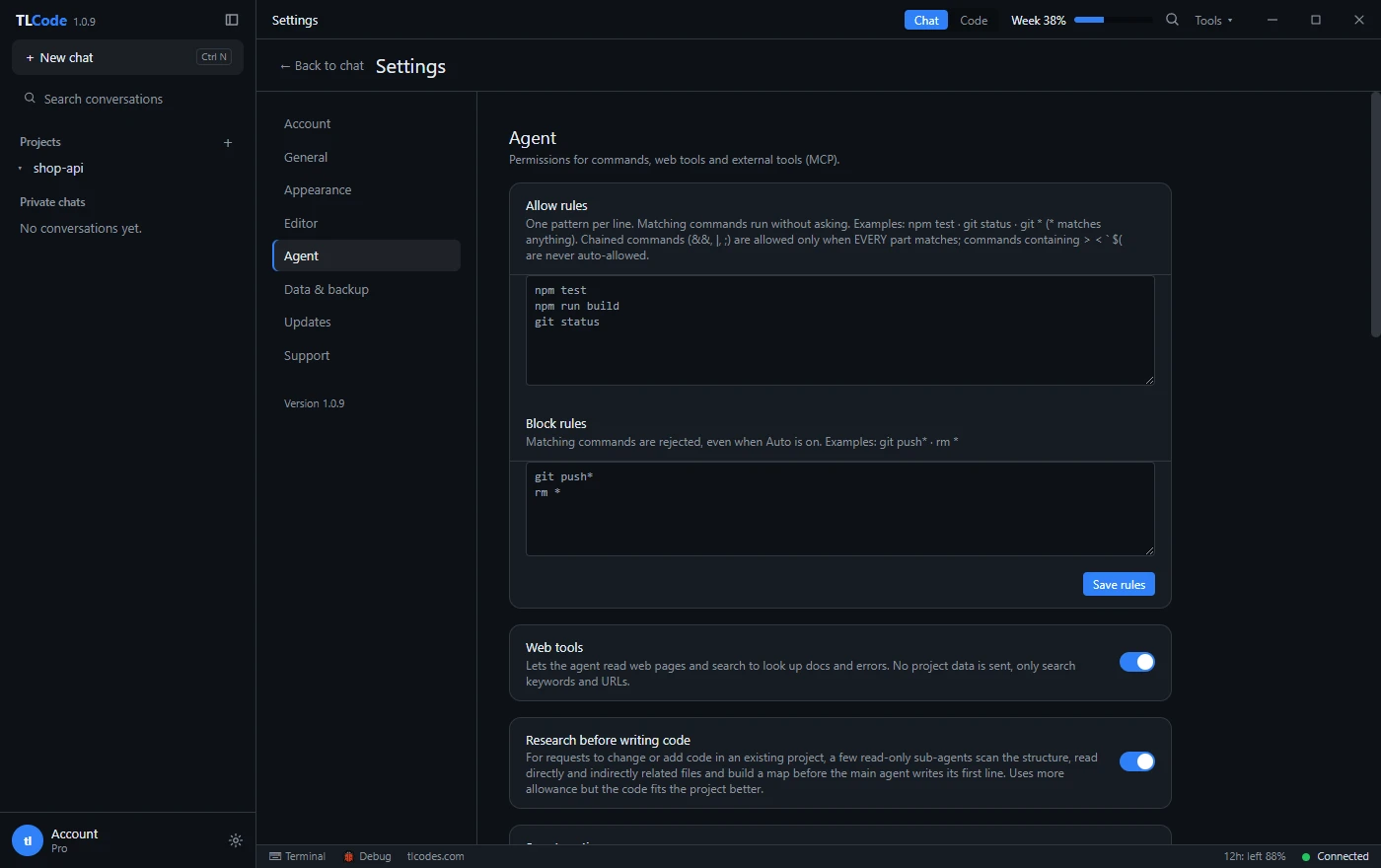
Safe defaults also make a more direct assistant easier to live with. When you know every file change appears as a diff you approve and every agent turn has an undo, you can afford to let the assistant attempt more. We cover those safety nets in running an AI coding agent safely.
The limits that should never go away
Any serious discussion of this topic has to state where the lines are, because they do not move with a tool’s settings.
Authorization is the line in security work
Testing a system you own, or one you have explicit written permission to test, is routine professional work. Testing anything else is not, whatever tool you use and however polite the request. Laws differ by country, so when in doubt, get the permission in writing and ask a lawyer about your situation. Our guide to AI for security research goes through what good scoping looks like.
Harming other people is out of scope
Malware, ransomware, phishing kits, account-takeover tooling, stalking tools, cheats that wreck other players’ games and anything that exploits children are not engineering questions. A provider that helps with them is a liability for you as well, because your account, your payment details and your IP address are attached to every request.
Licenses and terms still apply
Reading a binary to understand how it behaves is a long-established practice with legal conditions that vary by jurisdiction and by the license you accepted. Removing licensing checks to use software you have not paid for is not. If you work with proprietary code, read the license, and see our guide on AI-assisted reverse engineering of code you are authorized to analyze.
You own the result
The assistant writes code, but you ship it. You are responsible for what it does, for the data it touches and for the way you use it. Our Terms of Service say this in plain words, and most providers say something similar.
Questions to ask about privacy before you paste code
Freedom to ask anything is only useful if you can trust where the question goes. Before you adopt a tool, find out:
- What leaves your computer? In a desktop agent, project files can stay local while snippets and command output are sent for processing. Know which parts are which.
- Is it used for training? Some providers train on prompts unless you opt out. TLCode’s privacy policy states that prompts and code are forwarded to the model provider only to produce a response and are not used to train models.
- How are payments handled? Third-party payment providers should process cards. You should never need to hand card numbers to the coding tool itself.
- Can you delete your data? A support route for account and data deletion is a basic sign of a mature service.
- What happens if you abuse it? Clear terms about suspension are a good sign, because they show the provider takes responsibility for its own service.
Secrets deserve special care with any assistant. Do not paste passwords, private keys or tokens into a chat, and keep them in environment variables or a secrets manager so they never appear in the code you share.
The same request asked three ways
Small changes in wording often decide whether a cautious tool helps. These three prompts ask for the same thing. The third is the one a careful engineer would actually send, because it contains everything the assistant needs to produce the right code.
1. "Write a port scanner."

2. "Write a Python script that scans ports on a network."

3. "I administer a small office network (192.168.10.0/24, all devices
   owned by us). Write a Python 3 script using only the standard library
   that checks which hosts answer on ports 22, 80 and 443 with a 1-second
   timeout, prints a table of open ports per host, and exits with a
   non-zero code if anything unexpected is open. No packet crafting."
The first prompt is ambiguous, the second is only slightly better, and the third states ownership, scope, constraints and the purpose of the output. A direct assistant will answer all three; a cautious one is far more likely to answer the third. More importantly, the third prompt gives you code that fits your job: a report you can act on and an exit code your monitoring can use.
The same pattern works for other topics. “Explain what this function does” becomes “Explain what this x86-64 function does, it is from a vendor library we are licensed to use and it crashes on line 3 of our log.” “Write a login bypass” is the wrong request, while “write an integration test that logs in as a test user without going through the SSO redirect, using the test-only token endpoint we already have” is a normal engineering task. When your honest request is also a specific one, you rarely need to fight a filter at all.
A practical checklist for choosing a tool
Pull the threads together and a short checklist emerges:
- Run your ten-prompt test and compare directness, correctness and consistency.
- Check that the tool finishes real work in a project: it reads files, edits them, builds and reports honestly what failed.
- Confirm you have control: diffs you can reject, commands you can approve or block, and a way to undo a turn.
- Read the terms and the privacy policy. Look for clear prohibited-use language and a clear statement about training on your data.
- Check the pricing structure. Flat plans with stated allowances are easier to predict than metered bills; we explain TLCode’s weekly and 12-hour allowances in this guide.
- Check platform support. TLCode runs on 64-bit Windows 10 and 11 only, which rules it out if you work on macOS or Linux.
Where TLCode fits, and where it does not
TLCode is a Windows IDE with a built-in agent. Its model, Abliterated Large v2, is tuned to answer technical questions directly, including security, low-level systems and analysis of compiled code, and its Terms prohibit illegal use. You get Chat, Agent and Plan modes, a terminal, Git, Undo for every agent turn and permission rules for commands.
It is not the right choice for everyone. It does not run on macOS or Linux, it uses one tuned model rather than a menu of providers, and it is aimed at individuals and small teams rather than enterprises that need single sign-on and central administration. Our comparison with Cursor, Claude Code and GitHub Copilot explains where each tool is the better fit, and the pricing page lists the plans.
Frequently asked questions
Is an unrestricted AI coding assistant legal to use?
Using the tool is legal in most places. What you ask it to do is what matters. Writing code for systems you own or are authorized to test is routine. Using any tool to attack other people, to steal, or to violate licenses is not, and the legal consequences fall on you rather than on the assistant.
Will an unrestricted assistant write malware?
A responsible one will not. “Unrestricted” should mean fewer refusals for ordinary engineering, not a free pass for harm. Terms of service that prohibit malware, ransomware and account takeover are a sign of a provider you can trust with your account.
Why does my assistant refuse harmless requests?
Usually because a policy or filter matched a pattern, such as a word in your prompt, rather than judging your intent. Adding honest context about ownership and purpose often helps. If it does not, try a more direct tool.
Does being direct make the code less safe?
No. Directness is about how the assistant responds to your questions, not about the quality of its code. Review every change, run your tests and use a tool that lets you undo a bad turn.
Can I rely on any assistant for security-critical code?
Treat all AI-written code as a draft from a fast junior colleague. Review it, test it and have a human sign off before it reaches production, especially for authentication, cryptography and input handling. See how to review AI-generated code for a checklist.
What is the difference between a chatbot and an agent?
A chatbot answers in a text box. An agent reads your project, edits files, runs commands and checks the result. We compare the two in agent, chatbot and autocomplete.
Do I need a powerful computer?
For a hosted assistant, no. The model runs on the provider’s servers, which means you need an Internet connection but not a powerful graphics card.
Summary
Assistants refuse because of layered policies, training and filters that match patterns rather than intent. A sensible meaning of “unrestricted” is fewer pointless refusals on ordinary engineering work, combined with clear, stated limits on harm. Test tools with your own prompts, expect to provide context sometimes, keep your safety nets in the editor rather than in the model’s mood, and remember that authorization, licenses and responsibility for the result stay with you.