 TLCode
AI for security research: legitimate uses, workflows and the authorization line
Security work is full of tasks that look alarming to a keyword filter and are completely routine in practice. This guide covers where an AI coding assistant genuinely helps a defender, how to scope the work, and where the limits are.
Security engineering is a craft of small, careful scripts: a loop that checks every certificate in an inventory, a parser that turns a noisy log into a timeline, a harness that feeds a thousand malformed inputs to your own file reader. An AI coding assistant is well suited to this kind of work because most of it is glue code written under time pressure. It is also the field where general-purpose assistants refuse the most, since the vocabulary overlaps with attacks.
This guide is written for defenders and builders: application security engineers, platform teams, IT administrators, students preparing for capture-the-flag events and developers who want to understand how their own code can fail. It describes workflows that are legitimate when you have authorization, and it is explicit about the boundaries. It does not contain exploit recipes, and nothing here is advice to test systems you do not own.
Start with authorization, not with a tool
Every legitimate security activity begins the same way: you know who owns the systems you are about to touch, and that owner has agreed to the work. For your own laptop, your own home lab or a staging environment your employer provides, that is simple. For anything else it means a written statement of scope.
A short scope document answers five questions:
- What is in scope? Hostnames, IP ranges, applications and accounts you may test.
- What is out of scope? Production databases, third-party services, other tenants, anything you do not control.
- What techniques are allowed? Passive review, authenticated scanning, load, social engineering. Many programs forbid denial-of-service testing.
- When may you test? Maintenance windows, time zones, a named contact if something breaks.
- How is data handled? What you may copy, how long you keep it and how findings are reported.
Laws about unauthorized access differ from country to country, and good intentions are not a defense in many of them. If you are unsure, ask for the permission in writing and consult a lawyer about your situation. Bug bounty programs publish their own rules, and following them to the letter is part of the job.
Why start here in a guide about AI? Because it is also the best way to work with an assistant. A request that states ownership and purpose is easier for any tool to answer well, and it keeps you honest about what you are doing. Our overview of refusals and how to avoid false positives explains the mechanics.
Inventory and hygiene: the unglamorous 80 percent
Most real security improvement comes from knowing what you have and keeping it tidy, not from exotic techniques. These are tasks where an assistant saves hours and where the code is plainly defensive.
Certificate and TLS checks
Expired certificates and outdated protocol versions cause outages and findings in audits. A script that walks a list of your own hostnames and reports expiry dates and supported TLS versions is a classic assistant task. A good prompt names the language, the input format and the output you need:
Write a Python 3 script using only the standard library. Input: a text
file of hostnames (one per line, all owned by my company). For each host,
connect on 443 with a 3-second timeout, print the certificate expiry date
and the negotiated TLS version, and flag anything expiring within 30 days.
Output a CSV. Handle connection errors per host without stopping.
Dependency and configuration review
Assistants are useful for reading a lockfile and grouping dependencies by risk, writing a script that fails the build when a banned package appears, or explaining what an unfamiliar configuration flag does. You still need a real advisory source for vulnerability data, since a model’s memory of specific CVEs can be wrong or out of date. Use the assistant to automate the lookup and the report, not to be the database.
Secrets scanning
Searching your own repositories for accidentally committed keys is a standard control. An assistant can write the regular expressions, wire the check into pre-commit hooks and draft the rotation checklist for anything it finds. Never paste a live secret into a chat to “check if it is valid”. Rotate it instead.
Hardening checklists
Turning a vendor hardening guide into a script that audits a server, or into an infrastructure-as-code policy, is a good fit. Ask for the checks to be read-only first, review them, then decide what to automate.
Log analysis and detection
Defenders drown in logs. Parsing, correlating and summarizing them is where assistants shine, and the work is entirely on your own data.
- Parsing odd formats. Paste a few sample lines (with sensitive values removed) and ask for a parser plus tests. Models are good at inferring structure from examples.
- Building timelines. Ask for a script that merges several log sources by timestamp, normalizes time zones and groups events by session or host.
- Writing detection rules. Given a description of suspicious behavior and a few sample events, an assistant can draft a rule in your platform’s query language. Always test a rule against known-good and known-bad data before you trust it, and expect to tune it.
- Triage notes. Summarizing a day of alerts into a short report for the next shift saves time, provided a human reads it before it is acted on.
When you share log lines with any hosted tool, remove usernames, internal hostnames and tokens first, or replace them with placeholders. Treat the prompt as something that leaves your network.
Testing your own code harder
Developers can learn a great deal about their own software by feeding it unpleasant input. This is secure development practice, and it is a good fit for assistants because the harness code is boilerplate.
Property-based and fuzz testing
Ask the assistant to write a harness that generates random or mutated input for a parser you wrote, calls it, and checks that it never crashes or hangs. In Python, libraries such as Hypothesis make this concise. In Go, fuzzing is built into the standard test tooling. The assistant writes the scaffolding; you decide the invariants, such as “parsing never raises anything except ParseError”.
from hypothesis import given, strategies as st
from myapp.parser import parse, ParseError

@given(st.binary(max_size=4096))
def test_parse_never_crashes(data):
    try:
        parse(data)
    except ParseError:
        pass  # rejecting bad input is fine; anything else is a bug
Regression tests for known bug classes
When a dependency advisory describes a class of flaw, such as path traversal or unsafe deserialization, you can ask the assistant to write a test that proves your code is not affected, running only against your own test server. The test then protects you after the fix. This is the safest and most valuable form of “reproducing” a vulnerability: the output is a unit test, not an attack tool.
Reviewing authentication and input handling
Ask for a review of a single module, listing places where untrusted input reaches a sensitive operation, and have the assistant suggest specific tests. Then read its reasoning critically, because models can miss real issues and flag harmless ones.
Learning, labs and capture-the-flag events
People learn security by doing it in places where it is allowed: deliberately vulnerable practice applications, home labs and capture-the-flag competitions. An assistant is a patient tutor for these.
- Explain, then try. Ask how a class of bug works, then reproduce it against a practice target you set up yourself.
- Read other people’s writeups with an assistant. Paste the technique, ask what each step does and why it works.
- Check your own solutions. After you solve a challenge, ask for a review of your approach and alternatives.
- Follow event rules. Some competitions restrict outside help or automation. Read the rules before you use any assistant.
The goal is understanding. If you cannot explain a technique in your own words after the assistant has walked you through it, ask again until you can.
A safe agent workflow for security scripts
Security scripts touch networks and files, which makes a controlled environment important. A coding agent that runs on your machine should be used with care.
- Plan first. Ask for the plan before any code, and read it. A plan reveals whether the assistant understood your scope.
- Keep scripts read-only by default. Make the first version report what it would do, then enable changes deliberately.
- Review every diff. Do not run a script you have not read.
- Constrain targets in code. Hard-code allow-lists of hosts or ranges and make the script refuse anything outside them.
- Log what you run. Keep commands and outputs with timestamps so your report is accurate and you can retrace your steps.
- Use block rules. In TLCode you can add block rules such as
rm *orgit push*so those commands are rejected even when the agent runs on its own, and allow rules only for commands you trust.
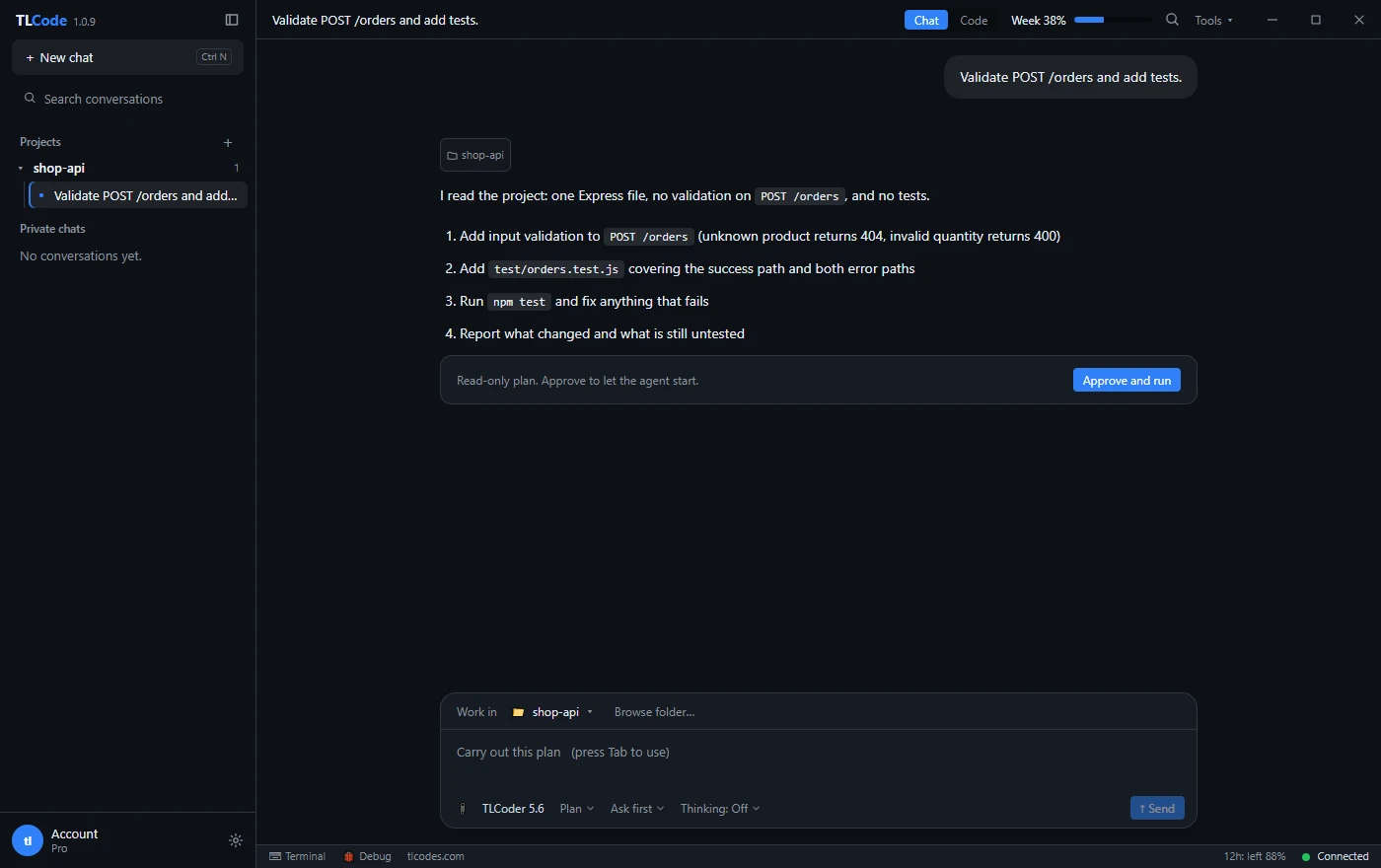
We go deeper on permissions, prompt injection and secrets in running an AI coding agent safely.
Threat modeling with an assistant
Threat modeling is thinking before building: what are we protecting, who might attack it, how, and what stops them. It is conversation-heavy work, which makes an assistant a good sparring partner, as long as you provide the system description and keep the decisions yourself.
- Describe the system in plain words. List components, data stores, external services and who can reach what. A simple data-flow description is enough.
- Ask for threats per component. The classic STRIDE categories (spoofing, tampering, repudiation, information disclosure, denial of service, elevation of privilege) give the assistant a structure and give you a checklist.
- Rank by impact and likelihood. The assistant can propose a ranking, but you know your business. Adjust it.
- Turn threats into tests and tickets. For every accepted threat, write a concrete mitigation and, where possible, an automated check.
- Revisit when the design changes. A threat model is a living document, so keep it in the repository next to the code.
A useful prompt for the first pass: “Here is a description of our file-upload service. For each component, list plausible STRIDE threats, the preconditions an attacker would need and one mitigation per threat. Mark any assumption you made.” That last sentence matters, because it forces the model to show where it guessed.
A worked example: auditing your own inventory
Here is how the pieces fit together in a small, realistic task. Imagine you manage about two hundred internal web services and want to know which ones still accept weak TLS versions. You own all of them, and your security team has approved the work.
Step 1: write down scope and constraints
Scope: hosts listed in inventory/hosts.txt (internal services owned by
Platform team). Read-only checks only. No authentication attempts. Max 5
concurrent connections. Run from the audit VM during the 02:00 window.
Step 2: ask for a plan
In a plan-first workflow you ask the assistant to propose steps before it writes anything. A reasonable plan lists the script’s inputs and outputs, how it handles timeouts and failures, how it limits concurrency, where results are stored, and what tests will prove it works. If the plan includes anything outside your scope, such as brute-forcing credentials, reject it and say why.
Step 3: build in small pieces
Ask for the connection and version check first, then a second request for concurrency and rate limiting, then a third for the report. Small diffs are easier to review and easier to undo. Run each piece against a single host you control before running it on the list.
def check_host(host, port=443, timeout=3.0):
    """Return the negotiated TLS version for host, or an error string."""
    ctx = ssl.create_default_context()
    ctx.check_hostname = False   # inventory check, not a trust decision
    ctx.verify_mode = ssl.CERT_NONE
    try:
        with socket.create_connection((host, port), timeout=timeout) as s:
            with ctx.wrap_socket(s, server_hostname=host) as t:
                return t.version()
    except (OSError, ssl.SSLError) as e:
        return f"error: {e.__class__.__name__}"
Notice what a careful reviewer would catch in this snippet. Disabling certificate verification is acceptable for a pure inventory check but would be dangerous anywhere else, so it deserves a comment and a test that makes sure the function is never reused for real connections. That is the value of reading every diff.
Step 4: run, record and review
Run the script in the window you agreed, save the raw output, and review the findings with the service owners. The assistant can then help you turn the findings into tickets, grouped by owner and ordered by risk, and draft the retest plan.
Step 5: close the loop
After fixes, run the same script again and compare. Save the script, its tests and the scope note in the repository, so the next audit starts from a known-good baseline. If the code is useful beyond this audit, ask the assistant to add a README and a few more tests before you share it with colleagues.
Setting up a safe lab
If you want to try techniques rather than only audit what you own, build a lab so nothing can leak into a real network.
- Isolate it. Use virtual machines on a host-only or internal network with no route to your real systems. Snapshot before you experiment so you can roll back.
- Use deliberately vulnerable practice software. Projects built for training exist for exactly this purpose.
- Keep credentials separate. Never reuse real passwords or tokens in a lab, and never place real customer data in it.
- Control what the agent can do. Open the lab project folder only, keep command approvals on, and add block rules for anything destructive.
- Document as you go. Notes make your learning repeatable and, if you ever turn the work into a talk or a report, accurate.
What an assistant should not be used for
Being direct about technical topics does not remove the line between research and harm. These uses are off the table, and a responsible provider says so:
- Testing, scanning or probing systems you do not own and have no permission to test.
- Building or deploying malware, ransomware, credential stealers or tools to take over accounts.
- Phishing kits, fraud tooling and anything designed to deceive victims.
- Cheats that damage other people’s experience in online games, and tools for cracking software licenses.
- Stalking, surveillance of individuals and exploitation of children.
TLCode’s Terms of Service prohibit these uses and allow account suspension without refund when abuse is detected or reasonably suspected. That is the right posture for any service you trust with your account.
Reporting findings and responsible disclosure
A finding is only valuable when someone fixes it. An assistant can help you write clearly, which is half the job.
A good finding report
- A one-sentence summary of the issue and its impact.
- Exact steps to reproduce on the affected system, with versions.
- Evidence: sanitized logs, screenshots or a minimal test case.
- A severity estimate and the reasoning behind it.
- A suggested fix and how to verify it.
When the bug is in someone else’s software
If you stumble on a flaw in a product you do not own, stop testing, avoid accessing other people’s data and contact the vendor privately through its security contact or published disclosure policy. Give the vendor reasonable time to fix the problem before you talk about it publicly. Many organizations publish a security.txt file or a bug bounty page that says how to reach them, and a coordinated approach protects both users and you.
Let the assistant edit, not decide
Use it to tighten wording, structure a report and check that steps are complete. Do not let it invent evidence, and never include data you are not allowed to keep.
Where AI assistance falls short in security work
Honest limits make you a better user.
- Models can be confidently wrong. A plausible explanation of a vulnerability can be incorrect in the details. Verify against documentation and by experiment.
- Knowledge goes stale. A model may not know about recent advisories or the latest version of a library. Check current sources for anything time-sensitive.
- Context is limited. Large codebases cannot be reasoned about as a whole. Break work into modules and ask focused questions.
- It does not replace review. Security-sensitive code needs a human reviewer, tests and, for critical systems, independent assessment.
- Prompts leave your machine. Share only what a request needs, and remove secrets and personal data.
Frequently asked questions
Can I use an AI coding assistant for penetration testing?
Yes, for the parts that are programming: writing parsers, glue scripts, report generators and test harnesses, on systems you are authorized to test. You remain responsible for scope, rules of engagement and the actions you take.
Why do general assistants refuse security questions?
Their policies and filters are written to avoid helping attackers and often match on vocabulary instead of intent. Providing honest context helps with some tools, and tools tuned for engineering work refuse less. See our guide to how refusals work.
Is it safe to paste logs into a hosted assistant?
Only after removing anything sensitive. Treat the prompt as data that leaves your network, check the provider’s privacy policy, and follow your organization’s rules about sharing data with third parties.
Can an assistant find vulnerabilities in my code?
It can point to suspicious patterns and suggest tests, which is useful as a second pair of eyes. It will miss things and flag false positives, so combine it with static analysis, dependency scanning, tests and human review.
What should I do if I find a vulnerability in someone else’s service?
Stop testing, do not access or copy other people’s data, and report it privately through the vendor’s security contact or disclosure program.
Do I need special permission to learn on practice targets?
Targets you set up yourself and deliberately vulnerable practice applications designed for training are fine. Public sites you do not control are not, even if they look unprotected.
Summary
AI assistants are at their best in security work when the task is defensive programming on systems you are authorized to touch: inventories, log analysis, test harnesses, detection rules and clear reports. Start with a written scope, ask for plans before code, keep scripts read-only until reviewed, and review every diff. Respect the limits: no unauthorized testing, no malware, no harming others. With those habits, a direct, technically capable assistant is a genuine force multiplier for defenders.