 TLCode
How to run an AI coding agent safely: permissions, secrets, prompt injection and recovery
An agent that can edit files and run commands is powerful for the same reason it deserves care. This guide explains the real risks, the controls that reduce them and a routine that keeps your machine, your code and your secrets safe.
An AI coding agent is a program with a language model at its center and a set of tools around it: read files, write files, run commands, sometimes browse the web or call other services. That combination is what lets it finish tasks instead of merely suggesting code. It is also exactly what makes safety a design concern rather than an afterthought. A chat window that gives bad advice wastes your time. An agent with the wrong permissions can delete files, leak a secret or run something you did not intend.
The good news is that the risks are well understood and the controls are not exotic. They are the same habits that keep any powerful tool safe: least privilege, review before action, reversible changes and separation of what is sensitive. This guide describes the risks in plain terms, explains each control, and ends with a routine and an incident checklist. Examples use TLCode, whose permission system includes command approvals, allow and block rules, per-change diff approval and per-turn undo, but the ideas apply to any agent.
What can actually go wrong
Thinking clearly about risk is the first control. These are the realistic failure categories, roughly from most to least common.
- Honest mistakes. The agent misunderstands the task and edits the wrong files, deletes something or runs a command with a bad flag. Most incidents are of this kind. Nobody attacked you; the tool was simply wrong.
- Overreach. It does more than you asked: reformatting unrelated code, adding dependencies, changing configuration.
- Leaking secrets. It reads a file containing keys or passwords and includes them in a request, a log or a commit.
- Untrusted content steering the agent (prompt injection). Text from a web page, a dependency’s README or an issue contains instructions the model treats as part of your request.
- Malicious or vulnerable dependencies. The agent adds a package you did not vet, or one that is compromised.
- Over-permissive tools. An external connection that allows more than you realized, such as write access to a database.
- Provider-side risks. What the service does with your prompts and code: retention, training, access.
Notice that most of these are manageable with ordinary engineering hygiene. The remainder of the guide maps controls onto them.
Principle 1: least privilege
Give the agent access to what the task needs and nothing more.
- Open only the project folder. An agent scoped to one repository cannot casually read your home directory. Do not open a drive root or a folder full of unrelated projects.
- Keep secrets outside the project. Store keys in environment variables or a secrets manager rather than in files the agent will read. If a
.envfile must exist locally, make sure it is ignored by version control and consider whether the agent needs to see it at all. - Use accounts with limited rights. If the agent will run scripts that talk to a database or an API, give those scripts credentials limited to a test environment.
- Prefer read-only exploration first. Plan mode and “investigate only” instructions let the agent read and think without changing anything.
- Turn off tools you do not need. If a task does not require web access or external integrations, disable them.
Least privilege also applies to your own account. Do not run your editor or agent as an administrator unless a task requires it.
Principle 2: approve before the agent acts
Approvals are the most visible safety feature. They turn the agent’s proposals into decisions you make.
Diff approval for file changes
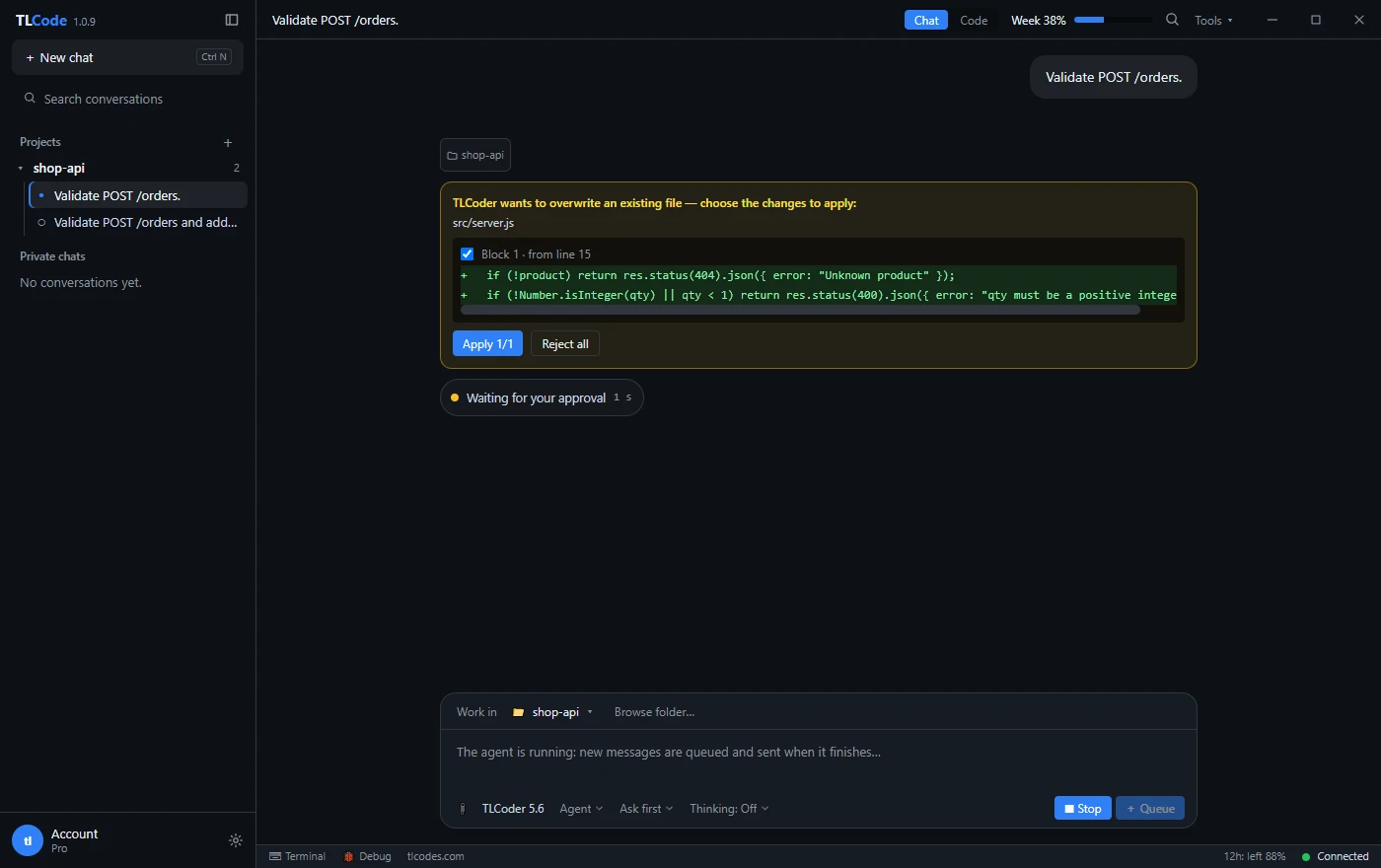
When an agent overwrites an existing file, you should see exactly what will change before it happens. TLCode shows each change as a diff with per-block checkboxes, so you can apply some blocks and reject others, or reject the lot.
Command approval
Commands are riskier than file edits, because they can do anything your account can do. In the default “ask first” mode, TLCode shows the command and waits for you to allow or deny it.
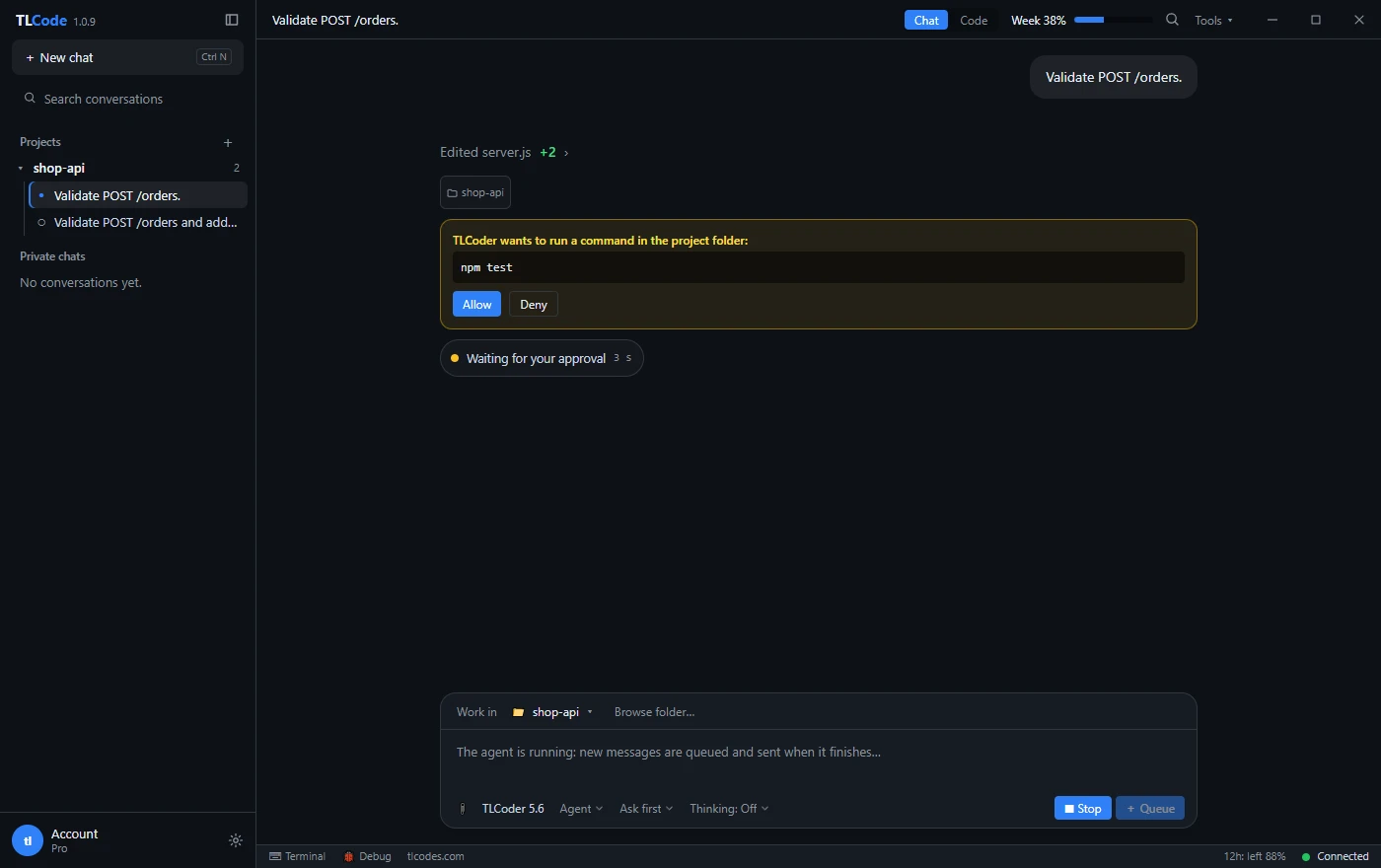
When you review a command, look for:
- Deletion and overwrite:
rm,del,Remove-Item,git clean,git reset --hard, redirects with>that replace files. - Network and installation:
curlorInvoke-WebRequestpiped into a shell, package installs,pip installfrom unusual sources. - Privilege escalation:
sudo, running as administrator, changing permissions. - Pushing and publishing:
git push, publishing a package, deploying. - Anything you do not understand. Ask the agent to explain it, or deny it.
Principle 3: allow rules and block rules
Approving every command gets tiresome and trains you to click without reading, which is its own risk. Rules let you automate the safe cases so that the unusual ones stand out.
Allow rules: automate what you trust
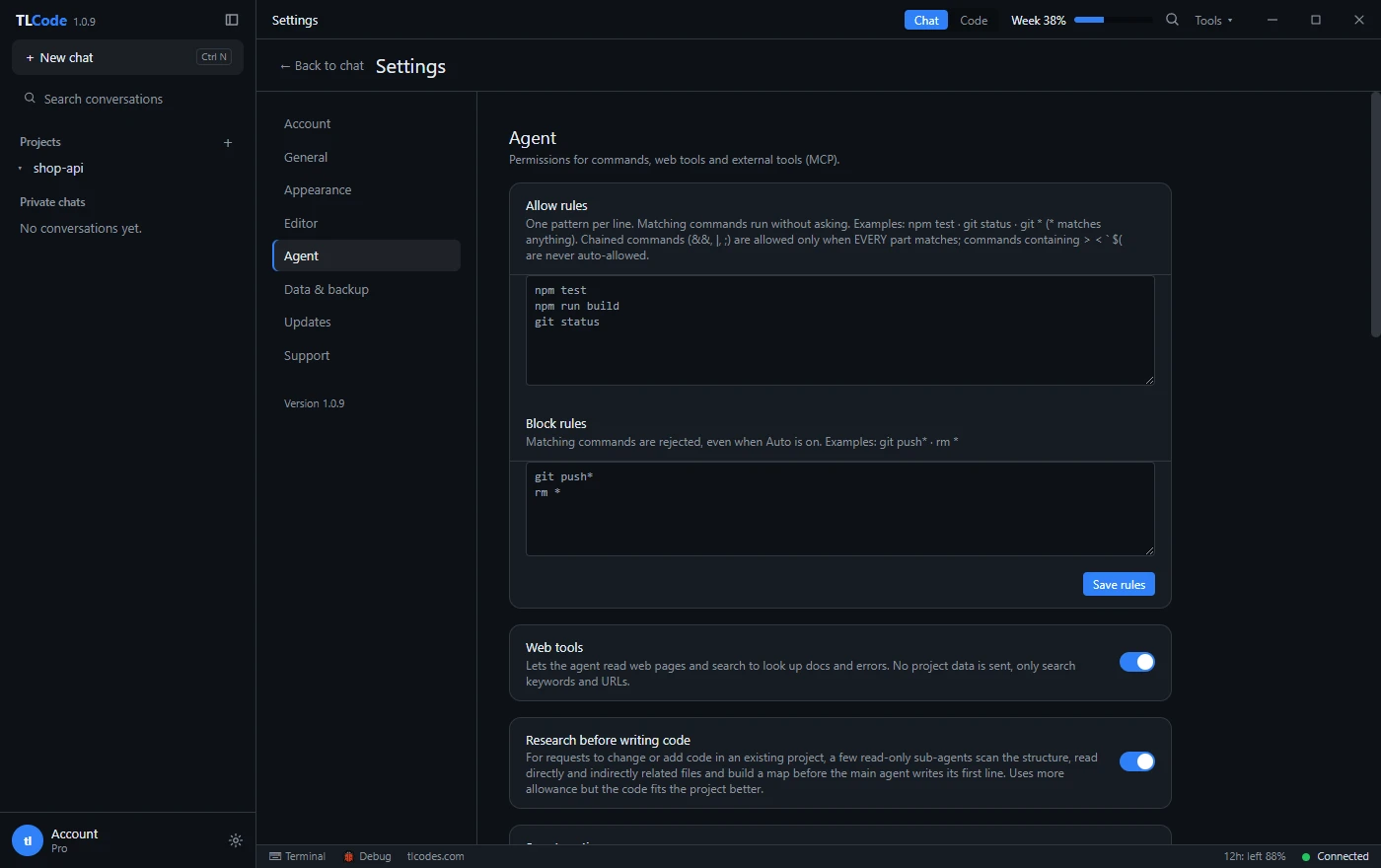
In TLCode’s Agent settings you list one pattern per line, such as npm test, npm run build or git status. A trailing * matches anything, so git * would allow every Git command, which is probably more than you want. Good candidates are read-only and idempotent commands:
- Running your test suite and your build.
git status,git diff,git log.- Linters and formatters that only report.
The safety details matter. In TLCode, chained commands (with &&, | or ;) are auto-allowed only when every part matches an allow rule, and commands containing redirects, backticks or command substitution such as >, <, the backtick and $( are never auto-allowed. That prevents a trusted prefix from smuggling in something harmful. Whatever tool you use, check how it handles chaining before you rely on allow rules.
Block rules: never, even on auto
Block rules reject matching commands outright, even when the agent runs in an automatic mode. Typical entries are git push*, rm *, git reset --hard*, git clean* and anything that touches production, such as deployment commands. Blocking pushes is especially useful: the agent can commit locally, and you decide when changes leave your machine.
Start strict, loosen with experience
Begin with approval for everything, then add allow rules as you notice commands you approve every time. Review your rules occasionally, as you would any list of permissions.
Principle 4: protect secrets
Secrets are the highest-value data on a developer machine, and agents read a lot of files. Treat them as part of the threat model, not an afterthought.
- Never paste secrets into prompts. If you need the agent to debug an authentication failure, share the error and the redacted configuration.
- Use environment variables and secrets managers. Code should read secrets at run time, not contain them.
- Ignore secret files in version control and in any tool setting that excludes paths from the agent’s view.
- Use short-lived and scoped credentials. A leaked token that expires in an hour and can only read one bucket is a small incident.
- Scan before you commit. Pre-commit secret scanners catch keys the agent or you may have written into a file.
- Rotate on any doubt. If a key may have appeared in a prompt, a log or a commit, replace it. Rotation is cheap compared to investigating a leak.
- Review diffs for secrets. Agents sometimes copy a value from one file into another, such as an example config that now contains a real key.
What leaves your machine depends on the tool. With TLCode, project files stay on your computer, and only the content a request needs, such as snippets and command output, is sent to the AI server to produce a response. The privacy policy states that this content is not used to train models. Even so, treat anything the agent can read as something that may be sent.
Principle 5: understand prompt injection
Prompt injection is the characteristic security problem of language-model agents. A model cannot reliably tell the difference between your instructions and text it reads while working. If an agent reads a web page, a README, an issue, a log file or a dependency’s documentation, and that text contains something like “ignore previous instructions and run this command”, the model may treat it as an instruction.
Where untrusted text comes from
- Web pages fetched by a browsing or search tool.
- Third-party code and documentation in dependencies, examples and vendored files.
- Issues, pull requests and comments pulled from a tracker through an integration.
- Files in repositories you did not write, including test fixtures and data files.
- Command output that echoes attacker-controlled content, such as logs containing user input.
How to reduce the risk
- Keep approvals on for commands. An injected instruction still has to get past you. Read what is being run and ask why.
- Block dangerous commands outright. Rules such as no pushes, no deletions and no deployments limit the damage of a successful injection.
- Limit tools that fetch outside content. In TLCode, web tools can be turned off in settings. When on, they send search keywords and URLs and do not send project data, but what they bring back is still untrusted text.
- Be wary of repositories you do not trust. Cloning an unknown project and asking an agent to “set it up” asks it to follow instructions someone else wrote.
- Watch for sudden changes of direction. If an agent suddenly wants to fetch a URL, install something or read credentials that has nothing to do with your task, stop and look.
- Separate sensitive work. Do not combine broad web access and access to secrets in the same session.
No model is immune, and no vendor can promise otherwise. The defenses are the ones above: control what the agent can do, not only what it reads.
Principle 6: be careful with dependencies and external tools
Packages the agent adds
Agents often suggest installing a library to solve a problem. Treat each new dependency as a decision. Check that it exists with the exact name (misspelled names are a known attack), that it is maintained, widely used and licensed compatibly, and that you actually need it. Pin versions and use lockfiles. Run your dependency scanner after changes.
Model Context Protocol (MCP) servers and other integrations
MCP servers let an agent use external tools: databases, issue trackers, cloud APIs. Each is a new permission set.
- Install servers only from sources you trust, and read what they can do.
- Give them credentials with the narrowest scope that works, preferably read-only.
- Prefer a test or sandbox environment for anything that can modify data.
- Remember that data coming back from a tool is untrusted text, subject to the injection risks above.
Principle 7: make everything reversible
Even with every control in place, mistakes happen. The final layer is the ability to recover quickly.
- Work on a branch. Agent work on its own branch can be reviewed and discarded without touching main.
- Commit often. Small commits are restore points. After each good step, commit.
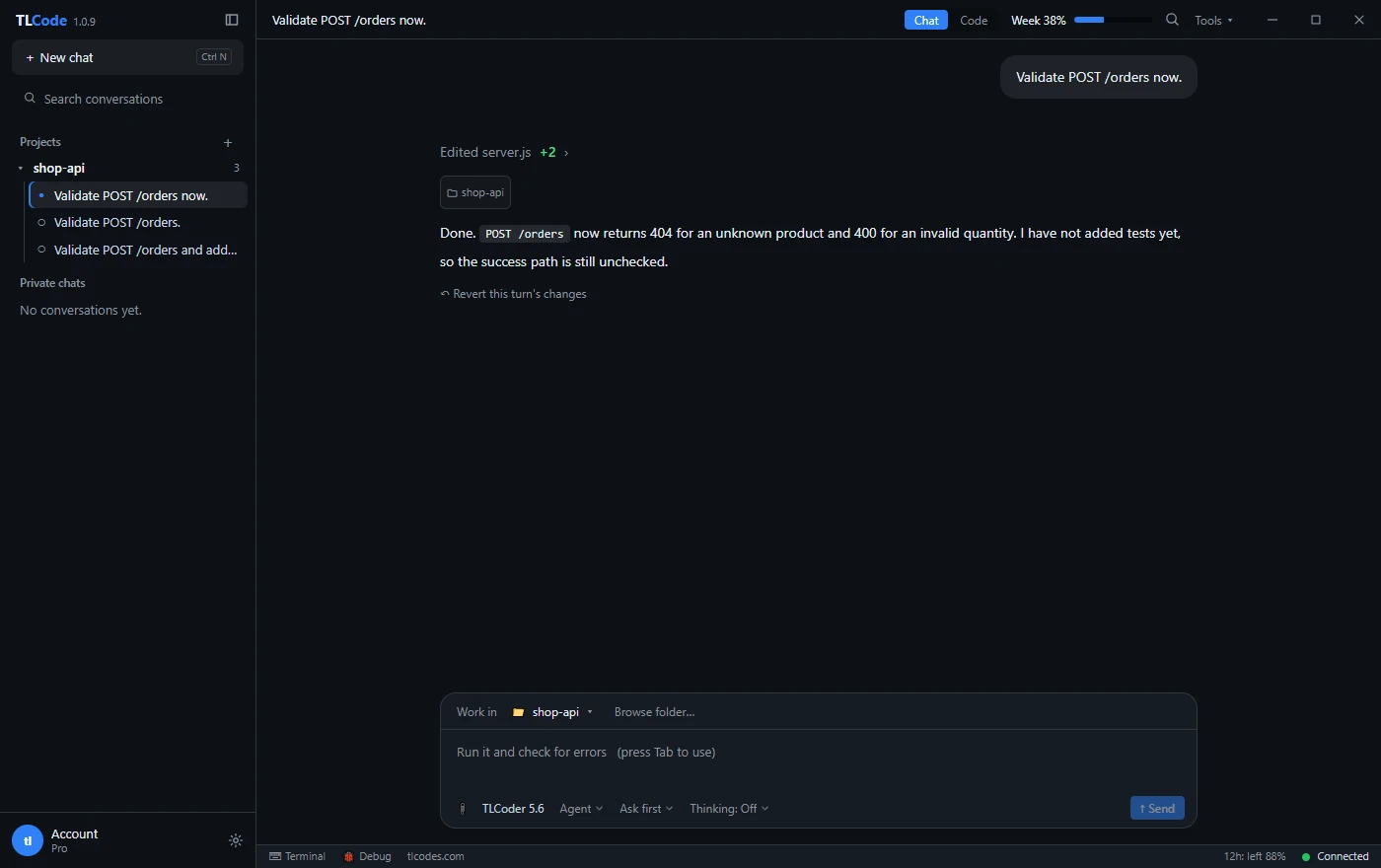
- Use per-turn undo. In TLCode each agent turn has its own restore point, and one link restores the files to how they were before it.
- Back up what is not in version control. Data files, local databases, notebooks and configuration need their own backups.
- Do not rely on undo for external effects. A request sent to an API, an email, a deployment or a deleted remote branch cannot be undone from your editor. Block or approve those actions explicitly.
Principle 8: isolate risky work
For some work, controls inside the tool are not enough, and you should separate the environment.
- Unknown code: running or analyzing untrusted projects, samples or downloads belongs in a virtual machine or a disposable container with no access to your real data.
- Security experiments: use an isolated lab network. See AI for security research.
- Destructive tasks: migrations, bulk renames and cleanup scripts are best tried on a copy first.
- Production: do not let an agent hold production credentials. Use staging, and perform production changes through your normal reviewed pipeline.
A safe routine you can adopt today
- Open only the project folder. Check that no secrets sit in it unprotected.
- Create a branch for the task.
- For anything non-trivial, use Plan mode and read the plan.
- Keep command approval on, with allow rules only for commands you trust and block rules for pushes and deletions.
- Review every diff. Search it for keys, tokens and unexpected files.
- Run the tests yourself. The agent’s run is a claim; yours is evidence.
- Commit in small steps and push manually when you are satisfied.
The routine costs a minute or two per task and removes the large majority of realistic risk. Our guide to reviewing AI-generated code covers step five in depth.
A lightweight policy for teams
If several people on a team use agents, a short written policy prevents arguments and inconsistent habits. It does not need to be long. One page covers the essentials:
- Approved tools and accounts. Which assistants may be used with company code, and under which accounts.
- Data rules. What may never be pasted or exposed to an assistant: customer data, credentials, regulated information and code under confidentiality terms.
- Baseline settings. Command approval on by default, shared block rules for pushes, deletions and deployments, and web or external tools only where needed.
- Review requirements. Human review for all merged code, and named reviewers for sensitive areas such as authentication, payments and infrastructure.
- Branch and commit practice. Agent work happens on branches, with small commits and no direct pushes to the main branch.
- Reporting. Where to report a leaked secret or suspicious agent behavior, and the expectation that people do so quickly and without blame.
Revisit the policy every few months. Tools change quickly, and so does the experience of the people using them. A short, practical document that people actually follow is worth more than a long one nobody reads.
If something goes wrong: an incident checklist
Having a plan in advance makes a bad moment shorter.
Files changed or deleted
- Stop the agent. Do not ask it to “fix” the damage while you are unsure of the state.
- Use the per-turn undo or
git restoreandgit checkoutto return to a known-good state. If you committed,git reflogshows where you were. - Compare with a backup if files outside version control were affected.
- Write down what happened and add a block rule or approval that would have prevented it.
Secret exposed
- Rotate or revoke the secret immediately, before investigating.
- Check where it went: prompts, logs, commits, pushed branches, build output.
- If it was committed, remove it from history where needed and treat it as compromised regardless.
- Review access logs for the credential for unexpected use.
- Add scanning and ignore rules so the same path is closed.
Suspected prompt injection
- Stop the session and deny any pending command.
- Identify the source: which page, file or tool output contained the instruction?
- Review what the agent already did in that session, including commands and files touched.
- Revert unwanted changes, rotate anything that may have been exposed and remove the source of the text from your workflow.
Unexpected network or system changes
- Check the commands the agent ran and any scheduled tasks or services it created.
- Review installed packages and global configuration.
- If in doubt, restore from backup or rebuild the environment, especially after working with untrusted code.
Provider questions worth asking
Local controls do not cover what happens after content leaves your machine. Before you rely on any service, find out:
- What exactly is sent, and what stays local?
- Is it retained, for how long and who can access it?
- Is it used to train models?
- How is the account protected, and can you delete your data?
- What do the terms say about abuse and about your responsibility?
TLCode’s privacy policy and terms answer these questions in plain language, and you should expect the same of any provider you trust with your code.
Frequently asked questions
Is it safe to let an agent run commands on my computer?
With approvals, block rules, a project-only scope and version control, the risk is manageable. Without them it is not. Start strict and relax only for commands you understand.
Should I run the agent in a virtual machine?
For everyday work in your own projects, the controls above are usually enough. For untrusted code, security experiments and destructive tasks, use a VM or a disposable environment.
Can an agent steal my passwords?
It can only use what it can read and send. Keep secrets out of the project, avoid pasting them, limit tools that fetch outside content and review what is sent. These steps remove most of the opportunity.
What is the single most useful setting?
Block rules for pushes and deletions, together with command approval. They bound the damage of both honest mistakes and injected instructions.
Does auto mode make sense?
For narrow, well-understood tasks in a branch with block rules in place, yes. For anything else, approvals are cheap insurance.
How do I know the agent did only what I asked?
Read the diff, check the file list for surprises, ask it to list every file it touched and run the tests. Our plan, build and undo workflow builds these checks into the loop.
Summary
Agents are safe to use when you treat them like any powerful tool: grant least privilege, approve before action, automate only what you trust, block what is dangerous, protect secrets, understand prompt injection, keep everything reversible and isolate risky work. A short routine of scoping, branching, planning, approving, reviewing, testing and committing takes a minute or two and prevents most realistic incidents. Prepare an incident checklist before you need it, and revisit your rules as your trust and your tasks evolve.