 TLCode
How to review AI-generated code: a practical checklist for developers
AI assistants write plausible code quickly, and plausible is not the same as correct. This guide gives you a repeatable review method, a list of the mistakes models make most often, and a way to keep changes small enough to trust.
Code review was always a skill, and AI changes what you are looking for. A human colleague who writes a bug usually writes a recognizable kind of bug: a tired slip, a misunderstanding of requirements, a missed edge case. An AI model writes code that is fluent, well formatted and confident, and its mistakes are often invisible at a glance. It may call a function that does not exist in your version of a library, use a pattern that was best practice five years ago, or quietly skip the hard part of the task and leave a comment saying it is done.
This guide is for developers who use an assistant or an agent every day and want to keep quality high. It covers a mindset, the failure modes worth knowing, a checklist you can apply to any diff, a worked example, and ways to make the process cheap enough that you actually do it. The advice is tool-agnostic, with examples from TLCode, where each file change arrives as a diff you can apply or reject and each turn can be undone.
The right mindset: a fast junior colleague
The most useful mental model is a very fast, well-read junior developer who never gets tired and never says “I am not sure”. You would not merge a junior’s first pull request without reading it. You would also not rewrite everything they produce, because most of it is fine and the speed is the point. The skill is knowing where to look.
- You are the author of record. If the code ships, it is yours. “The AI wrote it” explains nothing to a customer or an incident review.
- Trust is earned per task type. You can relax on boilerplate, formatting and routine transformations, and tighten up on authentication, money, concurrency and data deletion.
- Review effort scales with blast radius. A change to a README needs a glance, a change to a billing job needs a line-by-line read and a test.
- Reviewing is cheaper than debugging. Ten minutes with a diff costs less than an afternoon with a production bug.
The mistakes models make most often
Knowing the typical failures focuses your attention. These are patterns developers report across assistants, and all of them are worth watching for in any tool.
Invented or misused APIs
The model calls a method that sounds right but does not exist, or uses a real function with the wrong argument order or semantics. Compilers and type checkers catch some of these. In dynamically typed languages, only running the code or a good test will.
Outdated patterns
Training data lags the ecosystem. You may get deprecated library calls, old security advice, or patterns that a newer framework version replaced. Check the documentation for the version you actually use.
Plausible but wrong logic
Off-by-one errors, inverted conditions, time-zone mistakes, rounding of money as floating point, integer overflow, and the wrong boundary in a range check. The code looks reasonable and fails on the second or third input.
Skipped edge cases
Empty input, null, very large input, duplicate values, unicode, negative numbers, concurrent access. The happy path works, and the first unusual user finds the gap.
Insecure defaults
String-built SQL, missing input validation, permissive CORS, disabled certificate checks “to make it work”, secrets in code, overly broad file permissions. Models copy patterns from tutorials that were never meant for production.
Over-engineering
Extra layers, abstractions and configuration that nobody asked for. The code works but is three times larger than it needs to be, which makes it harder to review and maintain.
Silent scope creep
Changing files you did not mention, renaming things, reformatting unrelated code, or adding dependencies. These changes bury the real edit inside noise.
Declaring victory too early
A summary that says “tests pass” when the tests were never run, or “fixed” when the fix addresses the symptom. Ask for the evidence: the command that was run and its output.
A review process that fits in ten minutes
You do not need a heavy ritual. A short, consistent sequence catches most problems.
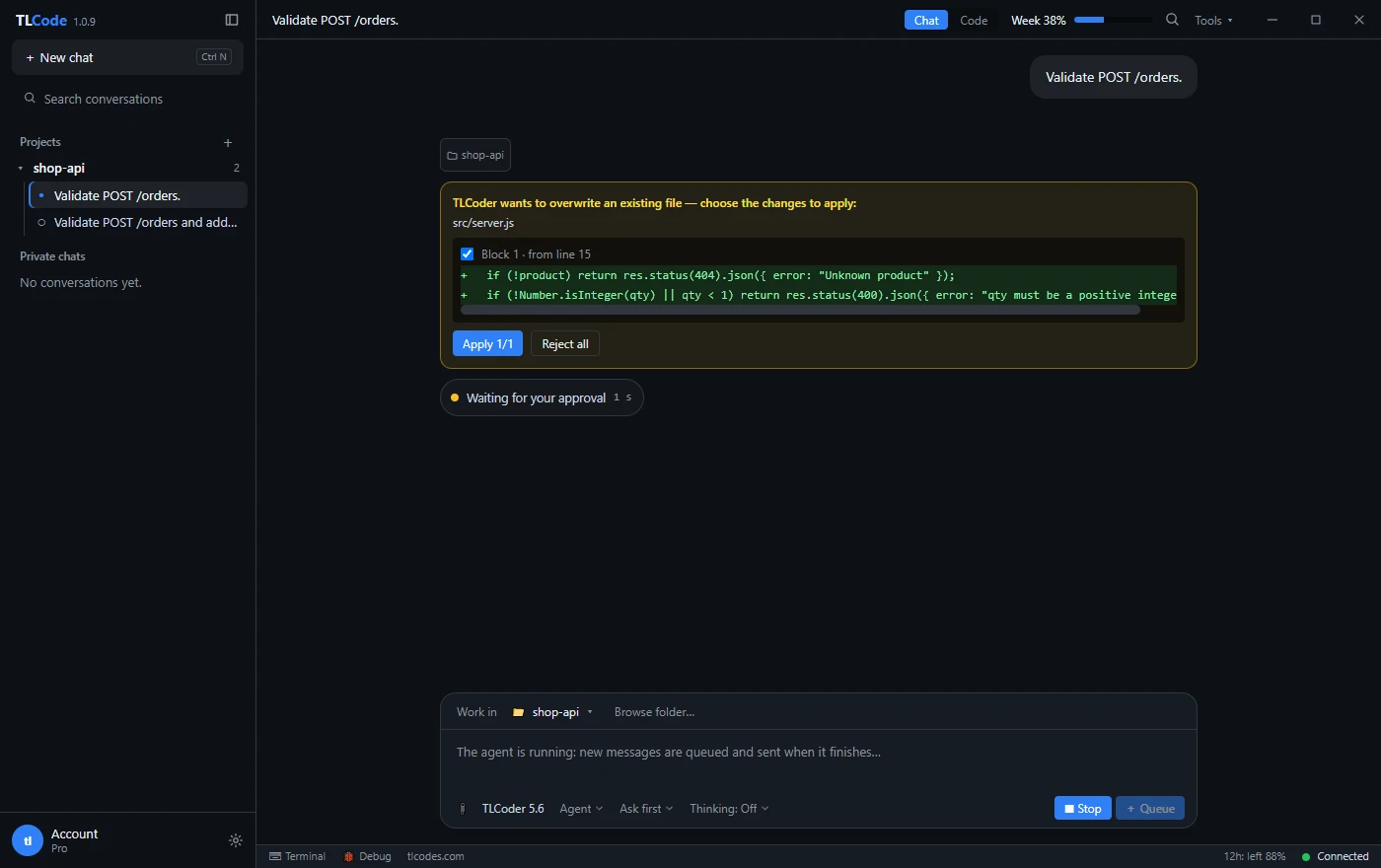
- Define done before you start. Write the acceptance criteria in a sentence or two: “POST /orders returns 404 for an unknown product and 400 for a non-integer quantity, and existing behavior is unchanged.” If you cannot say what correct looks like, you cannot review.
- Read the plan. Plan modes and written plans let you correct direction before code exists. If the plan touches files you did not expect, ask why.
- Read the diff, not the summary. The assistant’s explanation tells you what it intended. The diff tells you what it did. Read every changed line.
- Run it. Build, run the test suite and try the change by hand. Reading cannot replace execution.
- Probe the edges. Try empty input, huge input, wrong types and repeated calls.
- Accept or undo. If the change is good, commit it. If it is not, reject or undo and give a sharper instruction instead of patching a bad direction.
How to read a diff well
Good diff reading is a learned skill, and it is worth doing deliberately.
Start with the shape
Before reading any line, look at which files changed and how many lines moved. A request to fix a validation bug that touches eight files and adds a dependency is already suspicious. Use git diff --stat or the diff summary in your editor.
Read tests first
If the change includes tests, read them before the implementation. Tests are the assistant’s interpretation of your requirements. If a test asserts the wrong thing, the implementation will be wrong in a consistent, convincing way.
Follow the data
Trace one input through the new code from entry point to output. Where does it get validated, transformed and stored? What happens when it is empty or malformed?
Look for what is missing
Absent error handling, absent logging, absent cleanup of temporary files, absent timeouts on network calls. Bugs hide in omissions more often than in what was written.
Check the boundaries
Every loop, range and comparison deserves a second look: less-than versus less-or-equal, zero-based versus one-based, inclusive versus exclusive.
Question every new dependency
Is it needed? Is it maintained? What license does it have? Does it duplicate something the project already uses? A convenient package can carry security and licensing consequences.
The checklist
Copy this into your pull-request template or your notes and tick items that apply.
| Area | Questions to ask |
|---|---|
| Correctness | Does it meet the acceptance criteria? Are boundaries right? Are types and units consistent? |
| Edge cases | Empty, null, huge, duplicate, unicode, negative, concurrent: handled or documented? |
| Tests | Do new tests fail without the change and pass with it? Do they assert behavior rather than implementation? |
| Security | Input validated? Queries parameterized? Secrets kept out of code? Permissions minimal? Errors not leaking internals? |
| Dependencies | Any new packages? Necessary, maintained, license-compatible? |
| Performance | Any accidental loops over large data, repeated queries, unbounded memory growth? |
| Maintainability | Naming, structure and size appropriate? Dead code removed? Comments explain why, not what? |
| Scope | Only the requested files changed? No unrelated reformatting? |
| Operations | Logging, metrics, configuration and migrations considered? Rollback possible? |
A worked example: reviewing an input validation change
Suppose you asked an agent to add validation to an order endpoint in a small Node API. The acceptance criteria were: an unknown product returns 404, an invalid quantity returns 400, valid orders still work. The agent produced this change:
app.post("/orders", (req, res) => {
  const { productId, qty } = req.body;
  const product = products.find((p) => p.id === productId);
  if (!product) return res.status(404).json({ error: "Unknown product" });
  if (!Number.isInteger(qty) || qty < 1)
    return res.status(400).json({ error: "qty must be a positive integer" });
  res.json({ total: product.price * qty });
});
At first glance it looks right, and most reviewers would accept it. Applying the checklist finds real questions:
- Types. If a client sends
"productId": "1"as a string,p.id === productIdis false, so the user gets a 404 for a product that exists. Is that the intended behavior, or should the API accept numeric strings? - Body presence. If the request has no JSON body,
req.bodymay be undefined in some setups and destructuring throws. Does the app guarantee a parsed body? - Upper bound. There is no maximum quantity. Is an order for a billion units valid? Money calculation with floating-point prices could also drift, so prices might belong in integer cents.
- Tests. The agent did not add any. Without tests, none of the above is proven or protected.
- Scope. The change touched only this handler, which is good.
You would now ask for tests that cover the unknown product, the invalid quantities (zero, negative, fractional, string, missing), and the happy path, and decide about the string-id question. This is a review that took five minutes and exposed three decisions the original request never made. See writing tests with an AI coding agent for how to get those tests written well.
Using the assistant to help review itself
A second pass by the same model finds some problems the first pass missed. It is no substitute for your review, but it is a cheap extra filter.
- Ask for a critique with a specific lens. “Review this diff for security issues only” gives more useful output than “is this good?”.
- Ask for failure scenarios. “List five inputs that would make this function misbehave, and write a test for each.”
- Ask what it assumed. “List the assumptions you made that are not in my request.” Models are surprisingly honest about this when asked directly.
- Ask for evidence. “Which command did you run, and what did it print?” If it cannot show it, it did not do it.
- Do not ask “are you sure?” Models often flip their answer under pressure. Ask for reasoning and tests instead.
Reviewing specific kinds of changes
The checklist is generic. Some kinds of change deserve extra, specific attention.
Database queries and migrations
Check that queries are parameterized, that new columns have sensible defaults and indexes, and that a migration is reversible or at least safe to run twice. A migration that locks a large table in production is a classic assistant blind spot, because the model has never seen your data volume. Ask what happens with ten million rows, and test on realistic data.
Concurrency and async code
Look for shared mutable state, missing locks, race conditions between check and use, and promises that are not awaited. Assistants write async code that looks correct and fails under load. Where possible, write a test that runs the operation many times in parallel.
Public API changes
Renamed fields, changed status codes and altered defaults break callers you cannot see. Ask whether the change is backward compatible, whether the documentation was updated, and whether a version or deprecation path is needed.
Front-end code
Check accessibility (labels, keyboard use, contrast), state management, and behavior at different screen sizes and on slow networks. Run it in a browser. Screens that look right in a code diff can be broken in practice.
Shell scripts and infrastructure
Be cautious with anything that deletes, overwrites or deploys. Look for unquoted variables, missing error handling (set -e and friends), hard-coded paths, wildcard deletions and commands that run with elevated privileges. Run scripts in dry-run mode first and in a disposable environment.
Cryptography and authentication
Do not accept homemade cryptography. Use well-known libraries, current algorithms and the documented recommended parameters, and have a human with relevant experience review the change. Check how secrets are stored, how tokens expire and how failures are reported.
Configuration and secrets
Search the diff for keys, tokens, passwords and connection strings. Make sure new configuration has safe defaults and that example files contain placeholders, not real values.
Generated tests
Treat tests as code to review, not as proof. A test that only asserts the implementation returns whatever it returns is worthless. Read the assertions, break the code on purpose and confirm that the test fails.
Measuring whether your review process works
You can tell whether review is doing its job with a few simple signals. None needs special tooling.
- Escaped defects. How many bugs found after merge came from AI-assisted changes? If the number is rising, review depth is too shallow or diffs are too large.
- Rework rate. How often do you undo or rewrite a turn? Occasional undo is healthy. Constant undo means your task descriptions need work.
- Diff size. Track the typical size of changes you accept. If it creeps up, break work down more.
- Time to review. A healthy review of a small diff takes minutes. If you are spending an hour per change, the changes are too big or the plan was not clear.
- Test coverage of changed lines. If new behavior has no test, add one before merging.
Review the review occasionally. Pick a few merged changes at random, look for problems you missed, and adjust your checklist. Over a few weeks you will learn which failure modes your tools and your codebase produce most.
Tools that do part of the review for you
Automate everything a machine can check so your attention goes to what it cannot.
- Compilers and type checkers. TypeScript, mypy, Pyright and strict compiler flags catch many invented APIs and type mismatches.
- Linters and formatters. They remove style noise from diffs so you can see real changes.
- Test suites in CI. The agent should run them, and your pipeline should run them again.
- Static analysis. Security scanners for your language catch classes of issues such as injection and unsafe deserialization.
- Dependency and license scanners. They flag vulnerable or restricted packages the assistant added.
- Secret scanners and pre-commit hooks. They stop keys from being committed.
None of these replace judgment, but together they make review faster and more reliable.
Keep changes small enough to review
The single most effective habit is to ask for small steps. A twenty-line diff gets read. A two-thousand-line diff gets skimmed and approved.
- Plan, then build in steps. Large tasks should be broken into pieces that each build and pass tests.
- Commit after each good step. Frequent commits give you restore points and a readable history.
- Use a branch. Agent work on its own branch can be reviewed as a pull request.
- Undo freely. In TLCode each agent turn has a restore point, and a single link puts the files back. Rejecting and re-asking costs far less than fixing a wrong direction.
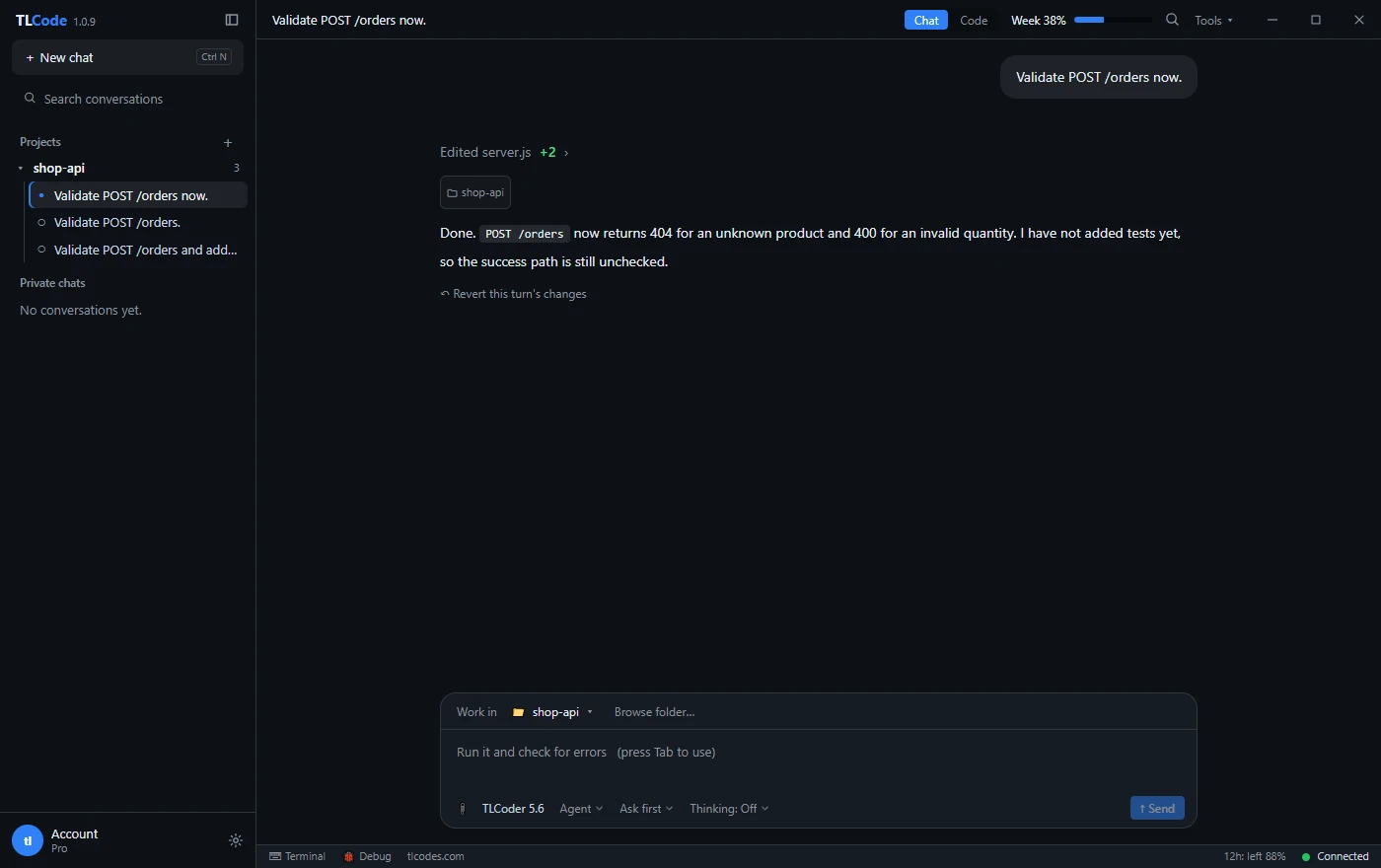
Our plan, build and undo workflow describes this loop in detail.
Team practices that make AI-assisted code safer
If several people use assistants, a few agreed rules prevent most trouble.
- Say when code is AI-assisted. A note in the pull request helps the reviewer calibrate. It is not about blame; it is about where to look.
- Require tests for behavior changes. No tests, no merge, regardless of who wrote the code.
- Keep humans on sensitive paths. Authentication, payments, data deletion and infrastructure changes need a named human reviewer.
- Share prompts that work. A short library of good task descriptions raises everyone’s output quality.
- Record decisions. If a review settles a question, such as string ids or maximum quantity, write it down where the next person will find it.
- Protect secrets. Remind everyone not to paste keys and personal data into any assistant.
Review anti-patterns to avoid
- Rubber-stamping because it passed once. One green run on a happy path is weak evidence.
- Reviewing only the summary. The summary is the assistant’s opinion of its own work.
- Letting the agent edit its own tests to make them pass. Check that test changes are justified, not convenient.
- Accepting giant diffs. If you cannot review it, ask for it in pieces.
- Over-correcting. Rewriting working code to match your taste wastes the time the assistant saved. Review for correctness and risk first, style second.
Frequently asked questions
Do I really need to review code from a good model?
Yes. Better models make fewer obvious mistakes and more subtle ones. Review depth should match risk, but skipping review altogether is how plausible bugs reach production.
How much slower does review make me?
Much less than debugging later. With small diffs, a plan and a short checklist, review typically takes minutes and often saves hours.
Can AI review my code instead of a human?
It can be a useful extra reviewer for specific concerns, but it should not be the only one. It shares blind spots with the model that wrote the code, and it cannot know your business context.
What is the best way to catch hallucinated APIs?
Compile or type-check, run the code and read the documentation for the version you use. Ask the assistant to cite the documentation section it relied on.
Should I commit AI-written code differently?
Treat it like any other code: small commits with clear messages, reviewed on a branch. Some teams add a note in the message or pull request description.
What about licensing of generated code?
Policies and law vary. Check your organization’s rules and your provider’s terms, and be careful with large verbatim chunks of unknown origin. When in doubt, ask a lawyer.
Summary
Treat the assistant as a fast junior colleague. Define done up front, read the plan, read every line of the diff, run the code, probe the edges, and undo what is not right. Know the common failure modes: invented APIs, outdated patterns, boundary errors, skipped edge cases, insecure defaults, scope creep and premature victory. Let compilers, linters, tests and scanners do what machines do well, keep changes small, and keep humans on the sensitive paths. That is how you get the speed of AI assistance without inheriting its mistakes. If you want a workflow built around these habits, download TLCode and try the plan, review and undo loop on a real project.