 TLCode
Debugging with an AI coding agent: a step-by-step method that finds the cause, not just a patch
Agents are very good at reading stack traces and very bad at guessing. This guide shows how to give an agent what it needs, keep it scientific, and finish with a fix and a regression test.
Debugging is a search problem. You have a symptom, a large space of possible causes and limited time. Good debuggers narrow the space systematically: reproduce the problem, form a hypothesis, test it, and repeat. Bad debugging, with or without AI, changes things at random until the symptom disappears and nobody knows why.
An AI agent can accelerate the systematic version dramatically. It reads stack traces and logs quickly, searches a codebase for related code and runs commands without getting bored. It can also accelerate the random version just as dramatically, producing a confident patch for the wrong cause. This guide gives you a method that keeps the agent working like a scientist rather than a gambler, with a worked example, prompts you can reuse and a list of traps to avoid.
Four principles before you start
- Reproduce first. If you cannot make the bug happen on demand, you cannot know that you have fixed it. A reproduction is worth more than any explanation.
- Find the cause, not a patch. A change that hides the symptom is a new bug waiting to appear. Ask “why does this happen?” before “how do we stop it?”.
- Change one thing at a time. Multiple simultaneous changes make results impossible to interpret.
- Leave a test behind. Every fixed bug should become a regression test, so it stays fixed.
The debugging loop
Give the agent what a good colleague would need
Most bad debugging sessions with an assistant start with a vague message: “login does not work, fix it.” A colleague asked the same would reply with questions. Answer them up front.
The bug report template
Problem: Order totals are off by one cent for some discounted orders.
Expected: 3 x 10.05 with a 15% discount should total 25.63.
Actual: the API returns 25.62.
Reproduce: POST /orders {"productId": 3, "qty": 3, "discount": 15}
Environment: Node 20.11, Windows 11, branch fix-discount, last known good
commit a1b2c3d (two weeks ago).
Already tried: restarting the server; the unit tests for pricing pass.
Constraints: do not change the public API response format.
Each line saves the agent from guessing. “Expected versus actual” defines the bug. The reproduction gives it something to run. The environment and last known good commit allow bisecting. “Already tried” prevents repeated suggestions, and constraints keep the fix inside safe bounds.
Share raw evidence, not summaries
Paste the full error message and stack trace, not “it throws a null pointer error”. Include the relevant log lines with timestamps. When the problem is visual, include a screenshot; TLCode can read text from pasted screenshots on your machine and hand it to the agent. Remove secrets and personal data before you share anything.
Say what you suspect, and flag that it is a guess
Your intuition is valuable, but anchoring the agent on a wrong guess wastes time. Phrase it as a hypothesis: “I suspect the rounding in applyDiscount, but I have not confirmed it.”
Build a minimal reproduction
The fastest way to understand a bug is to shrink it. Strip away everything that is not needed to make it fail: fewer inputs, no network, no database, the smallest data that still triggers the problem.
Agents are very good at this. A useful instruction: “Write the smallest failing test that reproduces the bug. Do not fix anything yet.” You get a concrete, runnable statement of the problem and a test that will later prove the fix.
// test/discount.test.js - fails before the fix
const test = require("node:test");
const assert = require("node:assert/strict");
const { totalWithDiscount } = require("../src/pricing");

test("3 x 10.05 with 15% discount is 25.63", () => {
  assert.equal(totalWithDiscount(1005, 3, 15), 2563);
});
If the reproduction passes, you have not reproduced the bug yet. Compare the environment, input data and configuration, and keep going. The agent can help diff configurations and list the differences between a working and a failing environment.
Generate and rank hypotheses
With a reproduction in hand, ask the agent for hypotheses rather than a fix. A prompt that works:
Do not change any files. Read src/pricing.js and the failing test.
List the three most likely causes of the cent difference, ranked by
likelihood, and for each one describe the quickest experiment that would
confirm or rule it out.
This does two useful things. It forces the model to reason about the code before acting, and it produces experiments you can check. For our example, a good list might include rounding applied at the wrong step (per unit instead of per order), floating-point arithmetic when computing the discounted price, and a unit mix-up between dollars and cents.
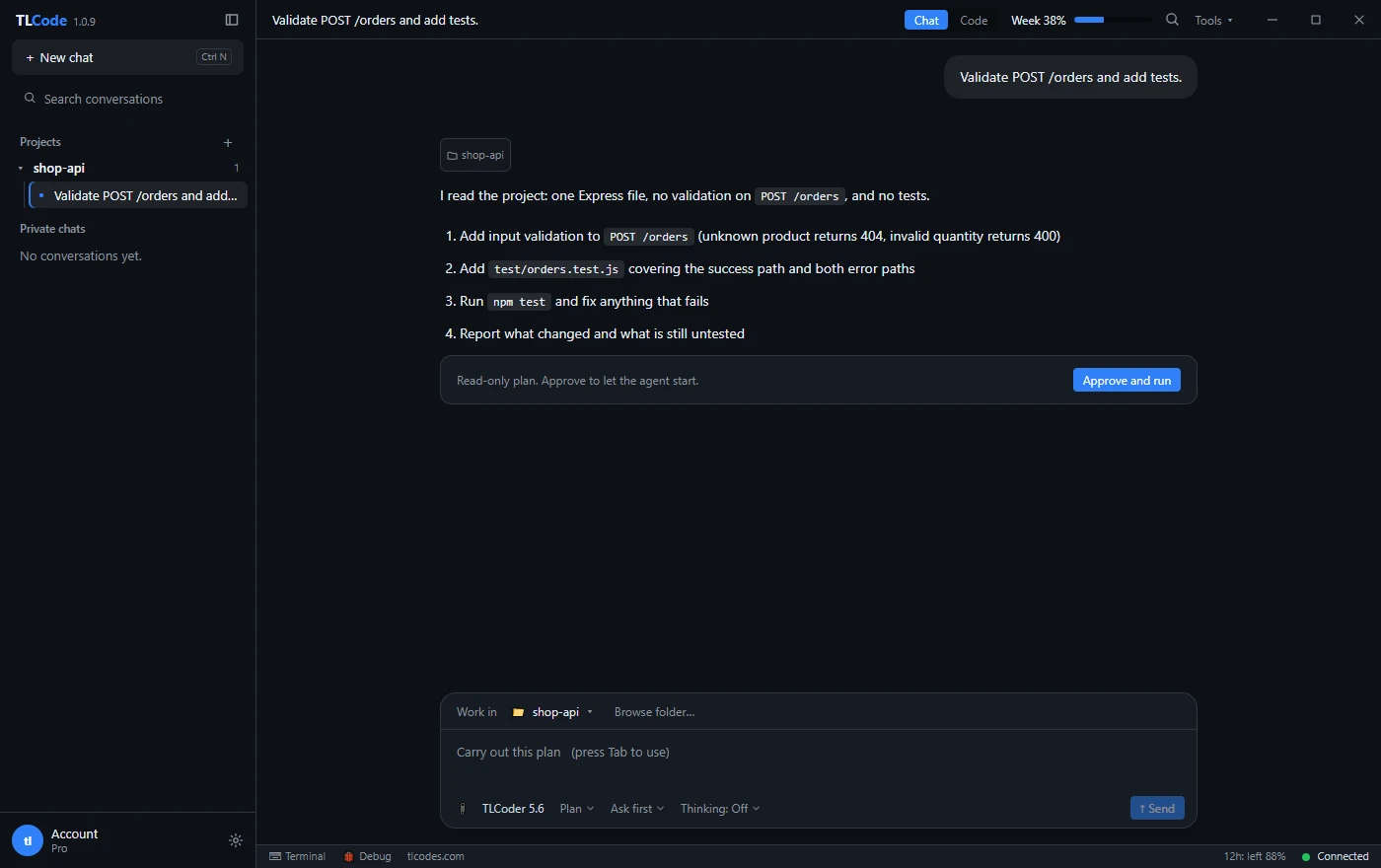
Plan modes help here. In TLCode’s Plan mode the agent reads the project and proposes steps without writing any file, which is an ideal setting for investigation.
Test hypotheses with experiments, not opinions
Every hypothesis should lead to an experiment whose outcome could prove it wrong. Typical experiments:
- Add targeted logging. Print the intermediate values around the suspected line. Remove the logging afterward.
- Evaluate in isolation. Call the suspect function directly with the failing inputs, in a REPL or a one-off script.
- Use a debugger. Set a breakpoint at the suspected line and inspect the variables. TLCode has a Debug panel for stepping through code, and your language’s standard debugger works too.
- Change an input. If the bug disappears with quantity two but not three, that is a clue.
- Swap a dependency version. Pin an older version of a library and see whether the behavior changes.
In our example, a one-line experiment compares the two rounding strategies with integer cents:
node -e "console.log(Math.round(1005 * 0.85) * 3, 3015 - Math.round(3015 * 15 / 100))"
# 2562 2563
Rounding the discounted unit price and then multiplying by the quantity gives 2562, while discounting the whole order once and rounding at the end gives 2563. The cause of the one-cent difference is where the rounding happens. Which result is right is a business rule, and the bug report says the order total should be rounded once. A patch that adds a hand-tuned correction would hide the symptom for some inputs and break others, which is exactly what root-cause debugging avoids. (Floating-point dollars would be a second, separate hazard here: 10.05 * 3 * 0.85 evaluates to 25.6275 only approximately, which is why money belongs in integer cents.)
Let the agent run the experiments, but read the output yourself. The conclusion should follow from evidence you can see.
Find when it broke: bisecting
If the bug is a regression, version control gives you a powerful shortcut. git bisect does a binary search through history: you tell it a good commit and a bad commit, and it checks out midpoints until it finds the first bad commit. If you have a failing test, you can automate the entire search.
git bisect start
git bisect bad HEAD
git bisect good a1b2c3d
git bisect run node --test test/discount.test.js
An agent can set this up, run it and explain the offending commit. Because bisecting runs commands that check out different versions of your code, do it on a clean working tree or a separate clone, and approve the commands yourself.
When there is no regression history, the same idea works with inputs: halve the failing input until the smallest failing piece remains, or disable half the features and see whether the bug persists.
Fix at the cause and verify
With the cause identified, ask for the smallest change that addresses it, and ask the agent to explain why it works. For the pricing bug, a good fix is to compute the order discount once, in integer cents, and round only that single value:
function totalWithDiscount(unitCents, qty, percent) {
  const gross = unitCents * qty;                  // integer cents
  const discount = Math.round((gross * percent) / 100);
  return gross - discount;                         // integer cents
}
Then verify properly:
- The reproduction test now passes.
- The whole suite passes. A fix that breaks something else is not a fix.
- The fix is at the cause. If you are touching code far from the origin, ask why.
- Related cases are covered. Add tests for rounding boundaries, zero discount and one hundred percent.
- Similar code is checked. Ask the agent to search for the same pattern elsewhere, such as other float money calculations.
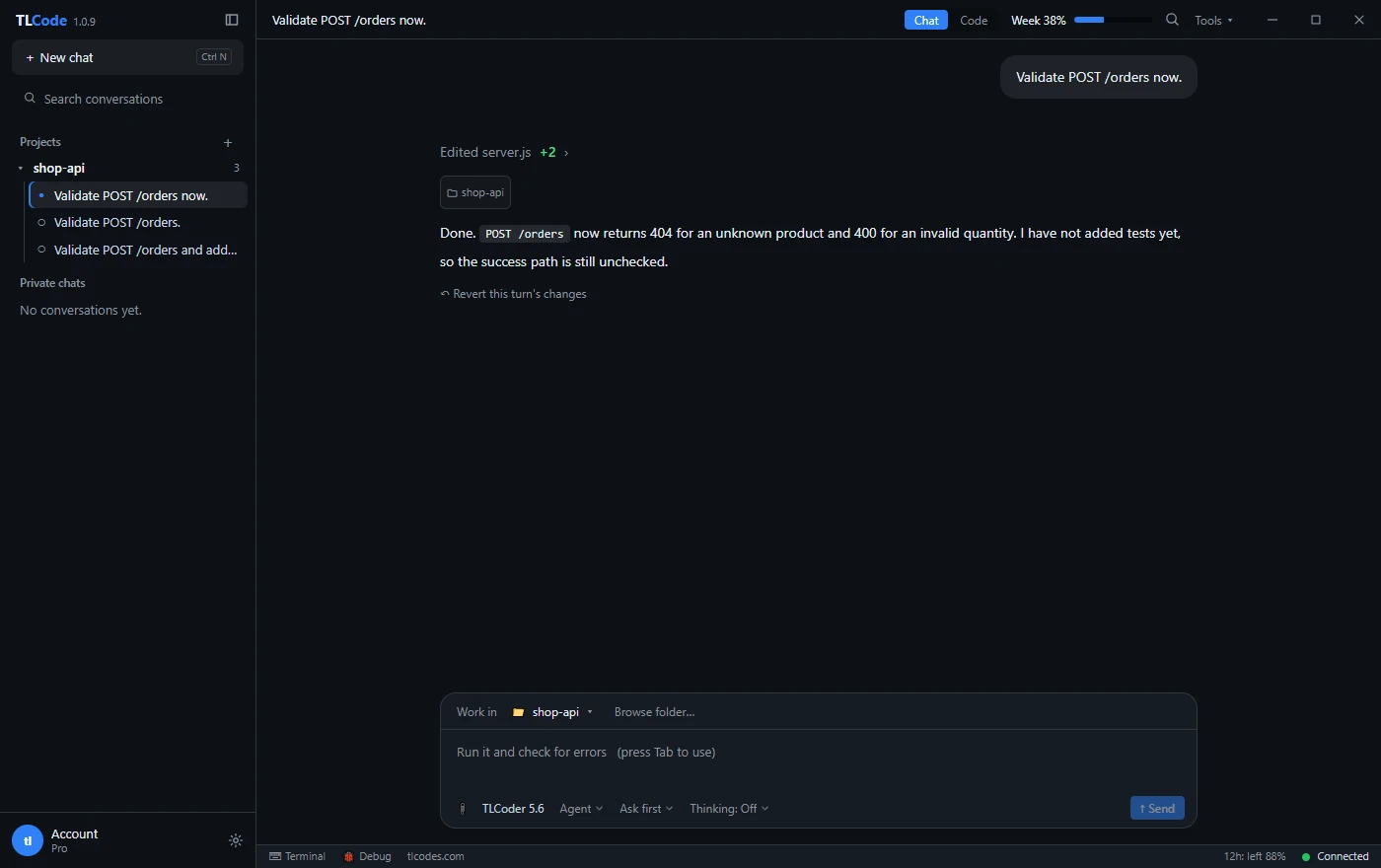
Read the diff before accepting it, as described in our guide to reviewing AI-generated code. If the agent changed more than the fix requires, undo the turn and ask again with tighter constraints.
What a good session looks like, start to finish
To tie the method together, here is the shape of a healthy debugging session on the pricing bug. The messages are illustrative, but the structure is what you should aim for.
Message 1: you ask for investigation only
Investigate only, do not edit files. Order totals are off by one cent
for some discounted orders (3 x 10.05 with 15% should be 25.63, API
returns 25.62). Read src/pricing.js and write the smallest failing test
for this case in test/discount.test.js. Then list the most likely causes
with one experiment each.
Message 2: the agent responds with a plan and a failing test
A good response contains a new test file, the output of running it (one failure showing 2562 versus 2563), and a short ranked list: rounding per unit versus per order, floating-point arithmetic, and a units mix-up. For each it names the experiment that would settle it. Notice what is missing: no source change, no confident claim of a cause, no “this should fix it”.
Message 3: you approve the experiment
Run the experiment for the first hypothesis only and show me the output.The agent runs a one-line comparison and prints both values. The evidence points to rounding per unit.
Message 4: you ask for the smallest fix
Fix it in src/pricing.js with the smallest change: compute the discount
once for the whole order in integer cents and round only that value.
Do not touch other files. Run the full test suite and show the summary.
The diff is a handful of lines. The new test passes and the existing suite still passes.
Message 5: you ask for the siblings
Search the codebase for other places that round per unit before
multiplying by quantity. List them with file and line. Do not change them yet.
The agent finds one more function in the invoice generator. You decide whether it is in scope, and you open a second task for it. Resisting the urge to fix everything at once keeps each diff reviewable.
Message 6: you close the loop
You read the final diff, run the tests yourself, commit the fix and the regression test together with a message that explains the cause. The whole session took a handful of messages and never required you to trust an unverified claim. If the agent had gone wrong at any step, such as proposing a fix before the experiment, you would have undone the turn and restated the constraint.
The value of this structure is that every step produces something you can check: a failing test, an experiment output, a small diff, a list. When the output does not look right, you notice immediately rather than after a long autonomous run.
Common bug classes and where to look
| Symptom | Usual suspects | First experiment |
|---|---|---|
| Works locally, fails in production | Config, environment variables, versions, data differences | Diff the configuration; reproduce with production-like data |
| Fails intermittently | Race conditions, timeouts, shared state, time or randomness | Run in a loop; fix the seed and clock; add logging with timestamps |
| Off by one or wrong boundary | Loops, ranges, pagination, inclusive versus exclusive | Test the smallest and largest values |
| Null or undefined errors | Missing data, async ordering, optional fields | Log the value before the failing line |
| Wrong number by a tiny amount | Floating point, rounding, units | Evaluate the arithmetic in isolation |
| Memory grows over time | Leaks, unbounded caches, listeners never removed | Take heap snapshots over time |
| Slow under load | N+1 queries, missing indexes, synchronous work | Profile; count queries per request |
| Works until a dependency update | Breaking change, changed default | Read the changelog; pin the old version to confirm |
| Encoding problems | Character sets, line endings, locale | Inspect raw bytes of the input |
Prompts that keep the agent scientific
- Investigate only: “Do not edit any files. Find where this error originates and explain the chain of calls that leads to it.”
- Explain the trace: “Here is a stack trace. Which frames are my code and which are library code? What is the most likely root cause?”
- Experiment first: “Propose the smallest experiment that would distinguish hypothesis A from hypothesis B and run it.”
- Minimal reproduction: “Write the smallest failing test. Show it failing before you change any source code.”
- Evidence for claims: “You said the cause is X. Show the line and the output that proves it.”
- Scope the fix: “Make the smallest change that fixes the root cause. Do not refactor or touch unrelated files.”
- Search for siblings: “Find other places in the codebase with the same pattern and list them without changing them.”
For more on writing instructions, see how to write prompts for AI coding agents.
Traps to avoid
Patching the symptom
Wrapping code in try/catch, adding a null check at the crash site or special-casing the failing input makes the error vanish and leaves the cause. Insist on a root cause.
Letting the agent loop on guesses
If the agent has tried three fixes and the bug persists, stop. Ask it to summarize what it has learned, what each attempt ruled out and what it still does not know. Then restart with a clearer hypothesis, or step in yourself.
Changing tests to match the bug
If a test fails, the code may be wrong or the test may be wrong. Decide which before editing either one, and be suspicious when the agent edits assertions to get a green run.
Trusting a confident explanation
Models can explain a wrong cause convincingly. Evidence comes from running code, not from fluent prose.
Debugging in production first
Reproduce locally or in staging when you can. Experiments in production risk making things worse and rarely teach you more.
Forgetting to clean up
Remove debug logging, temporary files and experimental changes before you commit. Ask the agent to list every file it touched during the investigation.
Special situations
Flaky tests and intermittent failures
Run the test many times to measure how often it fails. Control randomness and time, and look for shared state or ordering assumptions. Ask the agent to add timestamps and thread or request identifiers to logs, then compare a passing run with a failing one.
Bugs in code you do not own
Reproduce the problem in the smallest possible example, check the library’s issue tracker and changelog, and consider a workaround in your own code with a comment linking the issue. The agent can write the minimal reproduction you would attach to a bug report.
Performance problems
Measure before you optimize. Use a profiler or simple timing, find the hot spot, and only then change code. An agent can instrument the code and interpret the output, but guessing at performance fixes rarely works.
Build and environment errors
Read the first error, not the last. Compare tool versions, check that the working directory and PATH are what you expect and try a clean build. Agents are particularly good at deciphering long compiler errors.
Security-relevant bugs
If a bug could expose data or allow unauthorized access, treat it with extra care: fix it, add a test, check for similar issues and consider whether the exposure needs to be reported. Our guide on AI for security research covers responsible handling.
Frequently asked questions
Can an AI agent debug without me?
For many routine bugs, yes: it can reproduce, investigate and propose a fix on its own. You should still read the diagnosis and the diff. For subtle or high-risk bugs, work alongside it.
What if the agent cannot reproduce the bug?
Share more context: the environment, data shape, configuration, and exact steps. Ask it to list the differences between your setup and its own. Sometimes the answer is that the bug depends on data only you have.
Should I paste my whole codebase?
No. An agent in your project folder can read what it needs. Point it at the relevant files and keep conversations focused, since long histories cost more and dilute attention.
How do I stop the agent from changing unrelated code?
Say so explicitly, ask for the smallest change, review the diff stat and undo turns that go beyond scope.
Is it safe to let the agent run my programs while debugging?
Running your own tests is normally fine. Be careful with commands that modify data or reach external services. Use approvals and block rules, and prefer a local or staging environment. See running an AI coding agent safely.
Does it help with languages I do not know well?
Yes, as an explainer. Ask it to describe what unfamiliar code does and why the error occurs, and verify with experiments, since you are less able to spot a wrong explanation.
Summary
Debug like a scientist: reproduce, observe, hypothesize, experiment, fix at the cause and leave a regression test. Give the agent a complete bug report and raw evidence, ask for hypotheses before fixes, and demand evidence for every claim. Use bisecting for regressions and minimal reproductions for everything else. Keep fixes small, review the diff and undo when a turn goes astray. Used this way, an agent makes the loop faster without turning your debugging into guesswork.