 TLCode
How to write prompts for AI coding agents: templates, examples and anti-patterns
The difference between an agent that finishes the job and one that wanders is usually the task description. Here is a structure that works, with examples you can copy.
People talk about “prompt engineering” as if it were a dark art. For coding agents it is closer to writing a good ticket. The agent is a capable colleague who has never seen your project before this minute, cannot read your mind and will do exactly what you ask, including the wrong thing. If you give a good ticket, you get a good result. If you give a one-line wish, you get a guess.
This guide breaks a good task description into five parts, shows before-and-after examples for typical jobs, and covers the habits around prompts that matter just as much: giving context, using a plan, iterating, and asking for evidence. Everything here works with any agent. Where we mention features, we use TLCode’s, which has Chat, Agent and Plan modes, file attachments with @, slash commands and a message queue.
The anatomy of a good task
A good task description has five parts. You do not need long paragraphs. A sentence or two for each is enough.
1. Goal: the outcome, not the steps
Say what should be true when the work is done: “Users can reset their password by email.” Resist the urge to dictate every step, because the agent often knows a faster path. Do dictate when you have a strong preference about the approach, such as “use the existing mailer service”.
2. Context: where the work lives
Point to the relevant files, modules, tickets and examples. The agent can search, but you know where to start. “The password logic lives in src/auth/. Follow the pattern used in src/auth/signup.js.” Mention versions, frameworks and conventions that are not obvious from the code.
3. Constraints: the rails
List what must not change and what is off limits. “Do not change the public API. Do not add dependencies. Do not touch the database schema.” Constraints keep diffs small and reviewable and save you from unwelcome surprises.
4. Acceptance criteria: how you will judge it
The most valuable part of the prompt and the most often skipped. Describe observable outcomes: “All existing tests pass. A new test covers expired tokens. The reset email contains a link that expires in 30 minutes.” With acceptance criteria, the agent can verify its own work and you can verify it too.
5. Deliverable: what to bring back
Say what you want in return: “Show a summary of changes, the test output and any assumptions you made.” This produces the evidence that makes review quick.
Before and after: ten everyday examples
These pairs show how a small amount of structure changes the result. The “before” prompts are the ones most people type first.
Adding a feature
Before: “Add search to the products page.”
After:
Goal: add a text search box to the products page that filters the list
as the user types.
Context: React app in src/. The list is in src/pages/Products.jsx and
data comes from useProducts() in src/hooks. Follow how Orders.jsx does
its filter input.
Constraints: no new dependencies; keep the existing sort order; debounce
input by 250 ms.
Acceptance: typing "key" shows only products whose name contains "key"
(case-insensitive); clearing the box restores the full list; add a test
for both.
Deliverable: summary of changed files and test output.
Fixing a bug
Before: “The export is broken, fix it.”
After:
Investigate first, do not edit yet. Exporting orders to CSV produces an
empty file when any order has a comma in the customer name.
Reproduce: node scripts/export.js --since 2025-01-01 (use sample/orders.json).
Write a failing test that shows it, explain the cause, then propose the
smallest fix and wait for my approval.
Refactoring
Before: “Clean up the billing module.”
After:
Goal: split src/billing.js (900 lines) into modules by responsibility
without changing behavior.
Step 1: write characterization tests for the current public functions.
Step 2: propose a module layout and wait for approval.
Constraints: public exports stay identical; one commit-sized step at a
time; all tests pass after every step.
Writing tests
Before: “Write tests.”
After: “Add tests for src/pricing.js using the existing node:test setup. Cover normal, boundary and invalid inputs for each exported function. Assert behavior, not implementation. Do not change source files. Run the tests.”
Explaining code
Before: “What does this do?”
After: “Explain what src/queue/worker.js does for a developer who is new to this project. Describe the flow from job creation to completion, mention failure handling and list the three places most likely to cause bugs.”
Migrating a dependency
Before: “Upgrade to the new version.”
After: “Upgrade library X from v3 to v4. First read the v4 migration notes and list breaking changes that affect this repository, with file references. Wait for my approval before editing. After approval, update in small steps and run the build and tests after each.”
Performance
Before: “Make it faster.”
After: “The /reports endpoint takes 4 seconds. Measure first: add timing around each stage and show me where the time goes. Do not optimize until we have numbers. Then propose changes ranked by expected gain.”
Reviewing
Before: “Review my code.”
After: “Review the diff of my current branch against main for security issues only: injection, authentication, secrets, unsafe deserialization. List each finding with file, line, impact and a suggested fix. Do not report style issues.”
Setting up tooling
Before: “Set up linting.”
After: “Add ESLint with the recommended rule set and a lint script to package.json. Fix only autofixable issues in a separate commit-sized change and list the remaining warnings without fixing them.”
Exploring an unfamiliar codebase
Before: “Understand this repo.”
After: “Give me a one-page orientation: the main entry points, how a request flows from the router to the database, where configuration lives and how to run the tests. Cite file paths. Do not change anything.”
Giving the agent the right context
An agent in your project can read files on its own, so you do not need to paste everything. You do need to steer it.
- Attach the key files. In TLCode you can type
@to attach a file to a message, which tells the agent exactly where to start. - Name conventions and examples. “Follow the pattern in X” beats a paragraph of rules.
- State versions. Language, framework and tool versions change what correct code looks like.
- Share the error, verbatim. Paste the real message and the command that produced it.
- Include screenshots when helpful. TLCode reads text in pasted screenshots on your machine and passes it to the agent, which is useful for error dialogs and terminal output.
- Leave out noise. Large, irrelevant pastes dilute attention and cost allowance.
- Keep secrets out. Do not include keys, passwords or personal data in prompts or in files the agent can read.
Plan first for anything bigger than a small edit
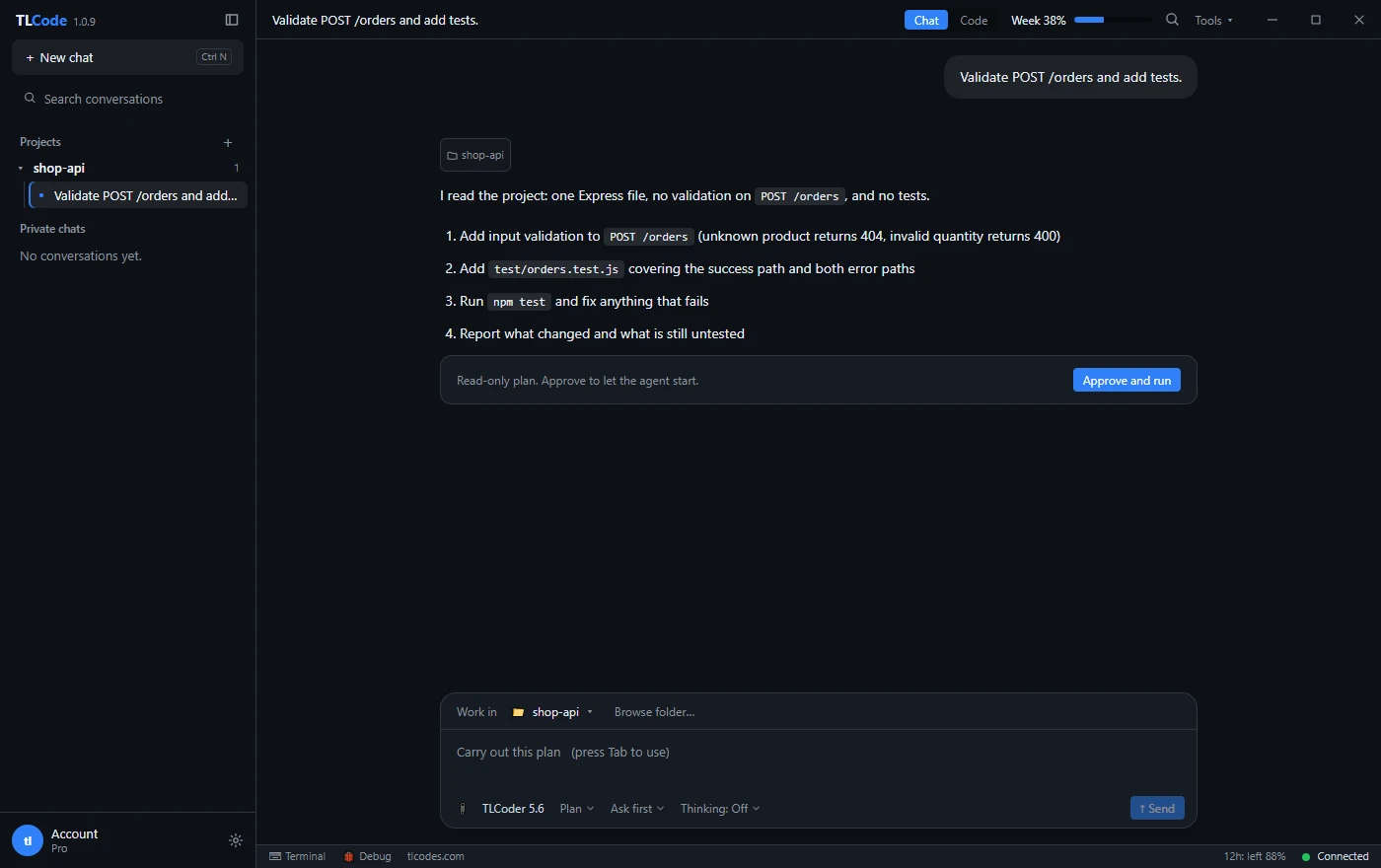
The cheapest place to fix a misunderstanding is before any code exists. For tasks that touch several files, ask for a plan and read it. Plan mode in TLCode does exactly this: the agent reads the project, proposes steps, writes nothing and waits. You can edit the plan, ask questions about it or approve it.
When you read a plan, check:
- Does it understand the goal and the constraints?
- Are the steps in a sensible order, each small enough to verify?
- Does it name files that actually exist?
- Does it include tests and a way to verify the result?
- Does it include anything you did not ask for?
For very large, vague requests, such as “build a small online store”, ask the agent to write a specification first and confirm it. Our plan, build and undo workflow describes the habit in detail.
Iterating without losing control
One topic per conversation
Long histories dilute the model’s attention and increase cost. Start a new conversation when the topic changes. Continue the same one while you are refining a single task.
Correct in specifics
“That’s wrong” gives the agent little to work with. “The test on line 40 should expect 400, not 200, because zero is invalid” does. Point to the line, the behavior and the reason.
Ask it to explain before you ask it to change
If a result surprises you, ask “why did you choose this approach?” before saying “do it differently”. You may learn that your request was ambiguous, or that the agent found a constraint you did not know about.
Use undo, not argument
If a turn went the wrong way, undo it and restate the task with the lesson included: “Last attempt rewrote the whole file. This time change only the validate function.” Patching a bad direction costs more than restarting from a clean state.
Queue the next message
If the agent is still running and you think of a follow-up, you can queue the message and it will be sent when the agent finishes, which avoids interrupting a task halfway.
Adjust the depth of thinking
Some tasks benefit from the model reasoning at greater length, such as tricky algorithms or subtle bugs, and others do not, such as renaming a variable. TLCode lets you set how much the model thinks for each conversation. Use more for hard problems and less for simple edits to save allowance and time.
Always ask for evidence
Agents write summaries that sound confident. Summaries are claims. Ask for the evidence that supports them:
- “Show the command you ran and the last twenty lines of output.”
- “List every file you changed and why.”
- “List any assumptions you made that were not in my request.”
- “What did you not verify?”
The last question is the most useful one. A good agent will admit gaps; a request for honesty in the report makes it more likely. Then verify the important claims yourself, as described in how to review AI-generated code.
Reusable templates
Keep a short file of templates and paste them when needed.
Feature template
Goal:
Context (files, patterns to follow):
Constraints (do not change / do not add):
Acceptance criteria (observable, testable):
Deliverable (summary, test output, assumptions):
Plan first? yes. Wait for my approval before editing.
Bug template
Problem:
Expected:
Actual:
Reproduce (command or steps):
Environment (versions, branch, last good commit):
Already tried:
Investigate only. Write a failing test first. Propose the smallest fix
and wait for approval.
Refactor template
Goal: restructure X without changing behavior.
Step 1: characterization tests for current behavior.
Step 2: propose the new structure; wait for approval.
Constraints: public API unchanged; tests green after every step; small steps.
Review template
Review this diff for: (security | performance | correctness | style).
Report only findings with file, line, impact and suggested fix.
Do not change files.
Anti-patterns
- Prompts written as wishes. “Make the app feel faster” is a hope. “Reduce time to first render of the dashboard under one second on the sample data” is a task.
- Overspecifying implementation. Dictating every line removes the benefit of the agent. Specify outcomes and constraints, and dictate approach only where it matters.
- Hiding constraints. If the agent cannot touch the schema or the public API, say so at the start, not after it has done so.
- Treating the first answer as final. The first pass is a draft. Plan, review, refine.
- Prompt cargo-culting. Magic phrases such as “you are the world’s best programmer” add nothing. Clear information beats clever wording.
A worked example: from vague to excellent in three rounds
Prompts improve by iteration. Here is how a single request evolves when you apply the structure, and what each round teaches you.
Round 1: the first instinct
Add rate limiting to the API.An agent will do something. It may choose a library you do not want, apply limits to every route including the health check, pick arbitrary numbers and store counters in memory, which breaks when you run two servers. Nothing in the prompt is wrong, but nearly everything is missing.
Round 2: add goal, context and constraints
Goal: limit abuse of the public API.
Context: Express app in src/server.js, routes in src/routes/. We run
two instances behind a load balancer and already use Redis (src/lib/redis.js).
Constraints: no new dependencies beyond what is in package.json; do not
rate limit /healthz; return 429 with a Retry-After header.
Now the agent knows to use shared storage, which routes to skip and what the response must look like. The plan it proposes will already be much closer to what you need. What is still missing is how you will judge success.
Round 3: add acceptance criteria and a deliverable
Acceptance: 100 requests per minute per API key; the 101st within the
window returns 429; the counter resets after the window; limits are
enforced across both instances; add tests using the existing Redis test
helper. Configurable through RATE_LIMIT_PER_MIN with a default of 100.
Deliverable: plan first (wait for my approval), then a summary of changed
files, test output and any assumptions.
The prompt is now about a dozen lines. It specifies behavior you can verify, a configuration point, a testing approach and the process. The result is likely to be a small, reviewable change that you can accept after a quick read, rather than a large, surprising one. The time spent writing the prompt was less than the time you would have spent untangling the first attempt.
The lesson generalizes: when a result disappoints, ask which of the five parts was missing from your prompt. It is almost always one of them.
Prompts for different kinds of work
Front-end work
State the framework and component library, the design source (screenshot, description or existing component), responsive requirements, accessibility expectations and how you will check the result: “Add a pricing card component matching the existing PlanCard layout. It must be keyboard accessible, readable at 320 px width and include a story or test.” Run the interface yourself, because screens that look right in a diff are not always right in a browser.
Back-end and APIs
Give request and response shapes, status codes, validation rules, authentication requirements, error formats and performance expectations. Ask for tests that call the real handlers. Mention database migrations and rollback explicitly.
Data and scripting
Describe the input format with a few sample rows, the output you want, the size of the data and how errors should be handled. Ask for a dry-run mode for anything that modifies files or databases.
DevOps and infrastructure
Be explicit about environments, naming, permissions and what must not be touched. Ask for read-only commands first, plans before changes and idempotent scripts. Keep production credentials out of any assistant’s reach.
Documentation
State the audience, the format, the length and the sources. “Write a README for new contributors: how to install, run the tests and submit a pull request. Base it only on the files in this repository, and mark anything you could not verify.”
Learning and explanation
Say what you already know and what you want to understand: “I know JavaScript but not Rust. Explain ownership using this function as an example, then give me a small exercise.” Explanations are better when the assistant knows your starting point.
Longer tasks and background work
For jobs that take many steps, break the work into milestones that each leave the project in a working state. State them in the prompt or in a spec file: “Milestone 1: model and migration, tests pass. Milestone 2: API endpoints. Milestone 3: UI.” After each milestone, review the diff and commit. If the agent runs out of its step budget, a good agent reports what is done and what remains so you can continue from there instead of starting over.
Specifications written to a file give you a durable record of intent. In TLCode, larger jobs can be split into steps in a SPEC.md checklist that you can review and edit, which is easier than trying to hold the whole plan in a chat window.
A pre-flight checklist before you press Send
A thirty-second check catches most weak prompts. Read your message once and ask:
- Could a colleague who has never seen this project understand the goal from the message alone?
- Did I name the files, tests or commands where the work starts?
- Did I say what must not change?
- Could I tell, from the result, whether the task succeeded? If not, add acceptance criteria.
- Is this one task? If it is three, send three messages or ask for a plan that sequences them.
- Did I leave out secrets and personal data?
- Do I want a plan first? For anything that touches more than a couple of files, the answer is yes.
If you answered no to any of these, fix the message first. The thirty seconds you spend now are cheaper than reading a long diff that solves the wrong problem.
Frequently asked questions
How long should a prompt be?
As long as it needs to be to state goal, context, constraints, acceptance criteria and deliverable, usually between three and fifteen lines. Longer is fine when the task is complex, provided every line carries information.
Should I use special formatting or keywords?
Plain language with clear structure works well. Bullets and labelled sections help the model and help you. Magic phrases do not.
Do I need to repeat instructions in every message?
Standing rules, such as coding conventions, are better kept in a project file the agent reads, or restated briefly at the start of each new conversation. Within a conversation, the model remembers earlier messages, although very long histories can drift.
Why does the agent ignore part of my prompt?
Usually because the prompt is long, mixed or contradictory. Split it into tasks, put the most important constraint first and check the plan before work starts.
Can I reuse prompts across projects?
Yes. Templates for features, bugs and refactors transfer well. Adjust context and constraints for each project.
What if I do not know what I want yet?
Use chat for exploration: ask for options with tradeoffs. Once you choose, switch to an agent task with a clear goal. Our comparison of agents, chatbots and autocomplete explains when to use each.
Summary
Write the task like a good ticket: goal, context, constraints, acceptance criteria and deliverable. Point the agent at the right files, ask for a plan before large changes, correct in specifics, undo instead of arguing and always ask for evidence. Keep a few reusable templates, keep conversations focused and break long jobs into milestones. Clear prompts are the cheapest improvement you can make to any agent workflow, and they pay back on every task.